


10 Best N64 HD Texture Packs
Want to relive classic Nintendo 64 games with modern visuals? HD texture packs are the answer. They replace old, blurry textures with sharp, high-resolution ones, making your favorite N64 titles look amazing on today’s screens. Here’s a quick rundown of the top 10 texture packs:
- Ocarina of Time Community Retexture Project V7: Faithful to the original with polished visuals for characters, dungeons, and HUD.
- Majora's Mask Cel-Shaded: A bold, cartoon-inspired reimagining of the eerie classic.
- Super Mario 64 HD Textures: Multiple styles, including UHD, hand-drawn, and DS-inspired options.
- Star Fox 64 HD Pack: Sharper graphics while keeping the original design intact.
- Perfect Dark HD Texture Pack: AI-upscaled textures for a crisp, detailed look.
- GoldenEye 007 HD Textures: Ultra-HD updates for environments, characters, and weapons.
- Mario Kart 64 Texture Overhaul: Redesigned visuals for tracks, characters, and menus.
- Banjo-Kazooie Ripped Textures: Upscaled textures with a "painty" aesthetic.
- Jet Force Gemini ESRGAN Pack: AI-enhanced textures for a polished experience.
- Resident Evil 2 N64 HD Sample: Machine-learning upscaled backgrounds for sharper visuals.
These packs are compatible with emulators like Project64, Mupen64Plus, and RetroArch, using plugins like GLideN64. Most require at least 4GB of RAM and are available for free on community sites like Emulation King, GitHub, and evilgames.eu. Whether you prefer realistic upgrades or stylized changes, there’s something here for every retro gaming fan.
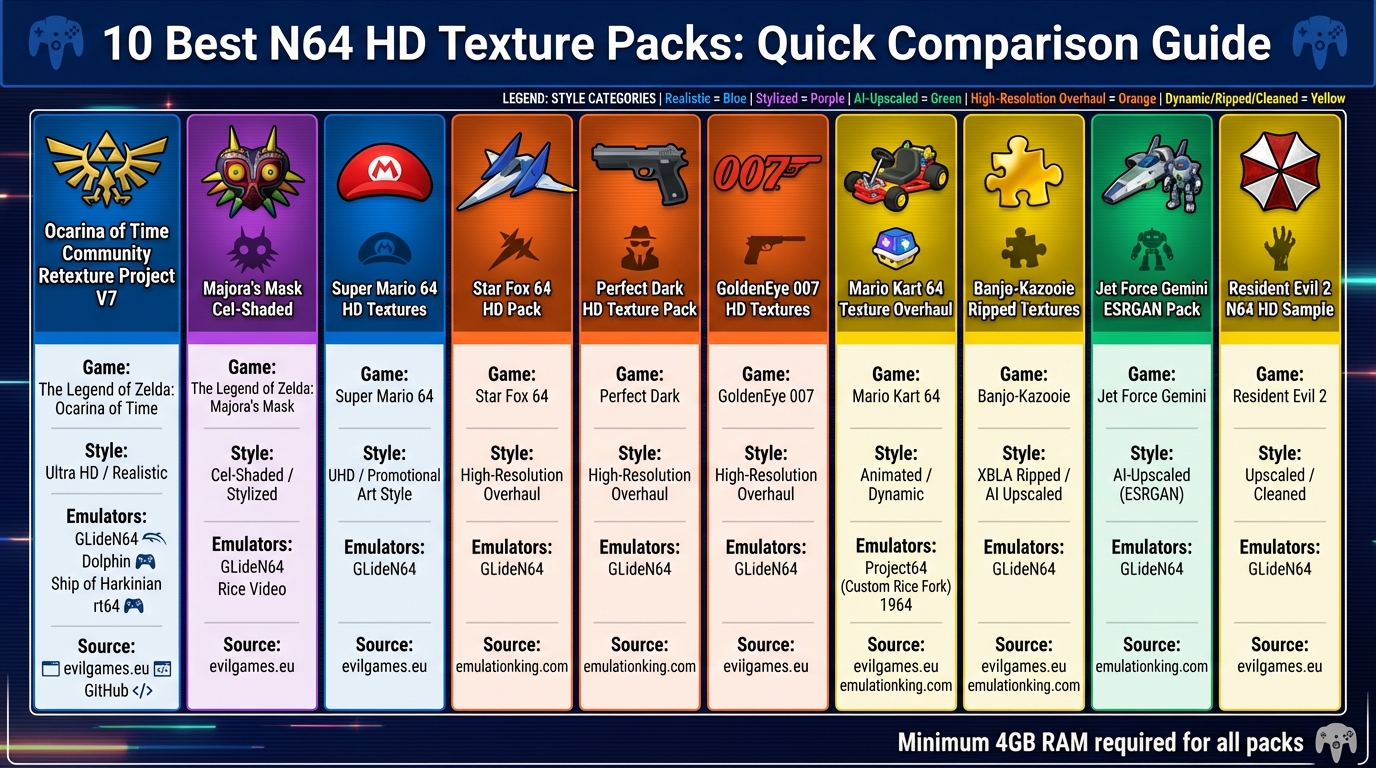
Top 10 N64 HD Texture Packs Comparison Chart
How to Install HD Custom Texture Packs in N64 RMG Emulator #nintendo64 #texturepacks #emulator
1. Ocarina of Time Community Retexture Project V7
The Ocarina of Time Community Retexture Project V7 is an HD texture pack that has been shaped and improved by a dedicated community, including contributors like mode7, Djipi, and Federelli. Since its inception in September 2008, this project has grown into a cornerstone for modern retexturing efforts, such as "OoT Reloaded."
Texture Style: Realistic Yet True to the Original
The goal of Project V7 is to refine the game’s original visuals while staying true to its essence. As project moderator death--droid puts it:
"This project does not seek to add a wildly different art style to the game, but to refine the original, keeping the original 'feel' of the game, and adding to what the original developers could not produce due to technical limitations."
This retexture pack enhances nearly every visual aspect, from characters and enemies to bosses and HUD elements. It also updates major overworld areas and dungeons, addressing longstanding issues like skybox glitches and map label inaccuracies.
Emulator Compatibility
Project V7 works seamlessly with popular N64 emulators such as Project64 and Mupen64Plus. It is optimized for the modern GLideN64 plugin, ideal for today’s systems, while still supporting the older RiceVideo plugin (version 0.4.4 or newer). To ensure smooth performance, allocate at least 4GB of system RAM and use the latest version of 7-Zip to extract the files properly.
Where to Download
You can find Project V7 on its main EmuTalk thread. For an updated version (released in January 2020) that includes additional fixes and compatibility updates for both standard Ocarina of Time ROMs and the Master Quest edition, visit LanPartyGuide.
2. Majora's Mask Cel-Shaded
The Majora's Mask Cel-Shaded texture pack, often nicknamed the "Celda" pack, brings a bold, animated twist to the classic game. Designed by the talented texture artist Djipi, this pack reimagines the visuals of Majora's Mask with a cel-shaded style reminiscent of The Wind Waker. Instead of enhancing the original textures with realistic details, it opts for vibrant flat colors and crisp lines, giving Termina a striking, cartoon-like aesthetic.
Texture Style: Cel-Shaded
Unlike most HD texture packs that aim to refine the game's original look, Celda takes a completely different route. Djipi's work introduces a fresh, animated vibe to the eerie and mysterious world of Majora's Mask. This artistic leap transforms the game into something visually unique, offering a new way to experience the classic without altering its core gameplay.
Emulator Support: GLideN64 Only
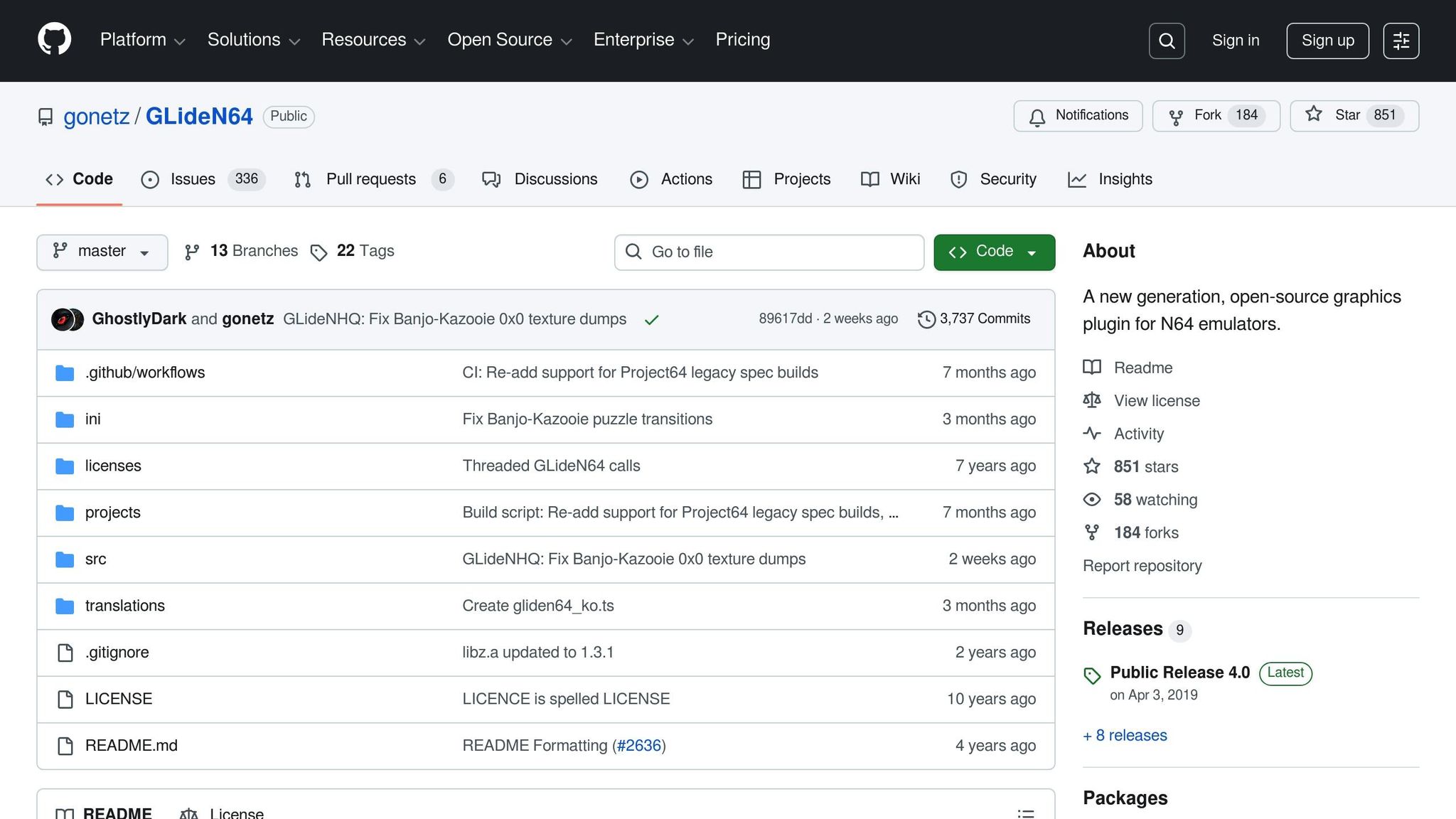
This texture pack is specifically designed for the GLideN64 plugin and is provided in .htc format. To use it, you'll need Project64 v2.3+, 4GB of RAM, and specific GLideN64 settings, including turning off "compress texture cache" and setting the cache size to at least 512MB. As community moderator NES_player4LIFE explains:
Djipi's packs are built for the (GLideN64) Plugin... Djipi has never made a pack for use with Rice video and never will. any packs found in this format are not authorized!
This clear guidance ensures a smooth setup process, making installation straightforward.
Download Source
You can download the texture pack from EmulationKing or Djipi's official MEGA link. Once downloaded, place the .htc file in your emulator's Plugin/GFX/cache folder. Be sure to remove the [CELDA] prefix from the file name so the emulator recognizes it properly.
3. Super Mario 64 HD Textures
The world of Super Mario 64 HD textures offers a range of striking visual upgrades. Among these, SM64-Reloaded, updated on January 19, 2026, stands out with approximately 20,000 reworked textures optimized for 2160p displays.
Texture Style
Super Mario 64 texture packs bring a variety of artistic styles to the table, letting players choose how they want the game to look. Here are four popular options:
- UHD/Realistic (SM64-Reloaded): This pack enhances the original textures with a modern, polished feel, perfect for high-resolution displays.
- Hand-Drawn (sm64redrawn): For a more personal touch, these textures are entirely redrawn by hand, offering intricate artistic detail.
- Retro/Cartoony (Risio's): This pack takes a playful, creative approach, reimagining the game’s visuals with a fun, cartoon-like twist.
- DS-Style (Super-Mario-64-HDS): Using ESRGAN AI, this pack delivers a 16x upscale, mimicking the style of the Nintendo DS era.
Emulator Support
SM64-Reloaded is compatible with several emulators, including Project64, Mupen64Plus (Rosalie's GUI), RetroArch (Mupen64Plus-Next core), and Dolphin (Wii Virtual Console). To use it, you'll need either the GLideN64 or rt64 plugins. If you're using Project64, make sure to enable the "Use file storage instead of memory cache" option to avoid the 32-bit memory limitations. For smooth performance, at least 4GB of RAM is recommended.
Download Source
You can download these texture packs from the following sources:
- SM64-Reloaded: Available on evilgames.eu or the GhostlyDark GitHub.
- Hand-Drawn (sm64redrawn): Download from TechieAndroid's GitHub.
- DS-Style (Super-Mario-64-HDS): Find it on allnought's GitHub.
Once downloaded, place the .hts file in your emulator's Plugin/GFX/cache directory. Then, enable texture pack support in the GLideN64 settings to enjoy the upgraded visuals.
4. Star Fox 64 HD Pack
UnaidedCoder's Star Fox 64 texture pack breathes new life into this iconic space shooter. By completely remaking every texture, it delivers sharper and more refined visuals while staying true to the original game's style.
"UnaidedCoders Star Fox 64 texture pack is an incredibly well made and faithful texturepack. It is easily the best available texture pack for Star Fox 64." - Emulation King
Texture Style
This pack takes a thoughtful approach to upgrading Star Fox 64’s visuals, enhancing the graphics without straying from the game's original design. For an even more polished experience, you can combine UnaidedCoder's pack with Razius's HD pack, which upgrades the UI, fonts, and particle effects. Together, these packs create a seamless visual overhaul that works beautifully across supported emulators.
Emulator Support
To enjoy these upgraded visuals, you’ll need an emulator that supports high-resolution textures. The Star Fox 64 HD Pack is compatible with Mupen64Plus and other N64 emulators that use GLideN64 or Rice plugins. Make sure your emulator resolution is set to 800x600 or higher for the best results. If you’re using RetroPie, place the pack in the hires_texture folder under a directory named STARFOX64, ensuring it matches the ROM header.
Download Source
You can find UnaidedCoder's Star Fox 64 Texture Pack in Rice format on community emulation sites like Emulation King. Razius's companion pack is also available from the same source.
5. Perfect Dark HD Texture Pack
The Perfect Dark HD Texture Pack by Gaming Revived takes the visuals of this classic game to a whole new level. Using TopazGigaPixel AI, the pack upscales textures to deliver sharp, detailed visuals while staying true to the original design. From menus to in-game elements, everything gets a crisp HD makeover.
Texture Style
This texture pack enhances the game's visuals with a realistic, AI-driven approach. The goal? Boost clarity without straying from the game's original aesthetic. The AI upscaling ensures textures are far sharper than the original Nintendo 64 resolution, while still maintaining the feel of the classic. Gaming Revived has applied this technique to over 150 Nintendo 64 games, and their Perfect Dark pack typically comes in at a size of 1GB to 2GB.
Emulator Support
The Perfect Dark HD Texture Pack is compatible with Project64 and Mupen64Plus, provided you're using the GLideN64 plugin (version 3.0 or 4.0). If you're a RetroArch user, you can also use the pack with the Mupen64-Next core. To ensure smooth performance, you'll need at least 4GB of RAM. The pack is delivered in .HTC format, which is pre-cached for better performance compared to older Rice format packs, resulting in a smoother experience across supported emulators.
Download Source
You can grab the Perfect Dark HD Texture Pack directly from Gaming Revived or trusted community sites like Emulation King. It's available in both Rice and GLideN64 formats, giving you flexibility based on your setup.
6. GoldenEye 007 HD Textures
The GoldenEye 007 HD Texture Pack breathes new life into this legendary N64 shooter by replacing its dated, low-resolution textures with ultra-HD assets. These updates sharpen the look of environments, characters, and weapons while staying true to the original game's aesthetic. Developed by intermissionfb, with font textures crafted by GhostlyDark, the pack tackles one of the game's most glaring visual shortcomings: rough polygon edges and blurry textures, a hallmark of early 3D gaming. This upgrade revitalizes the classic title without altering its beloved gameplay.
Texture Style
This pack takes a high-definition yet faithful approach to modernize the visuals while preserving the essence of the original design. Fonts have been refined for better readability at higher resolutions, enhancing the overall experience. A notable update on December 30, 2025, further improved font textures, reorganized the directory structure, and added more detail to iconic levels like the Dam, Facility, and Runway. Weapon models also received a crisp makeover, adding to the polished look.
Emulator Support
The pack is optimized for the GLideN64 plugin, widely recognized as the go-to choice for N64 texture packs due to its advanced rendering features, including fixes for skybox display issues. It also works seamlessly with emulators like Project64 and Mupen64Plus, though you'll need at least 4GB of RAM for smooth operation. For multiplayer sessions, using a 640×480 video mode strikes the best balance between performance and visuals.
Download Source
Downloading and setting up the GoldenEye 007 HD Texture Pack is straightforward. You can find it on the official GitHub repository (GhostlyDark/GoldenEye-007-HD) or at evilgames.eu. For those looking to further personalize their experience, such as adding custom crosshairs, the pack is compatible with Patcher64+. To install, ensure the texture folder is named "GOLDENEYE" to match the ROM header, and enable the "load hi-res textures if available" option in your plugin settings.
sbb-itb-9a4764e
7. Mario Kart 64 Texture Overhaul
The Mario Kart 64 Texture Overhaul breathes new life into the game by completely redesigning every visual element. From character sprites and courses to menus and even small details like shells and banana peels, everything has been meticulously recreated using the original title screen and promotional art as reference points. Let’s dive into its texture enhancements and emulator compatibility.
Texture Style
This pack offers a high-definition upgrade that stays true to the original game's signature "claymation" aesthetic while significantly improving clarity. It supports resolutions up to 4K, and when paired with the "Spaghetti Kart" PC decompilation, gameplay can reach up to 160Hz for an exceptionally smooth experience.
Emulator Support
The overhaul is compatible with several emulators, including Project64, Mupen64Plus, RetroArch (using the Mupen64Plus-Next core), and Dolphin when running Wii Virtual Console files. To get the best results, use the latest GLideN64 WIP builds.
- Project64: Enable "Use file storage instead of memory cache" to prevent crashes.
- RetroArch: Make sure to activate the "Use High-Res Full Alpha Channel" option.
- A custom Rice Video plugin fork is also included, which supports animated textures and dynamic sky colors for added visual depth.
Download Source
You can grab the full package from mariokart64reloaded.com or download the standalone GLideN64 version from the GhostlyDark/MK64-Reloaded GitHub repository. For manual installation, place the texture files in a folder named MARIOKART64 within your emulator’s hires_texture directory. Then, enable the "Load hi-res textures if available" option in your graphics plugin settings. For optimal audio performance, use Jabo's DirectSound plugin to avoid any slowdowns.
8. Banjo-Kazooie Ripped Textures
The Banjo-Kazooie Ripped Textures pack stays true to the original game's charm by reusing nearly 99% of the assets from the N64 classic. These textures have been carefully upscaled and enhanced with a "painty" aesthetic and embossed details, keeping Rare's original artistic vision intact while giving the visuals a polished, modern feel.
Emulator Support
This texture pack works seamlessly with Project64 and supports plugins like Rice Video Plugin, GLide64 HQ, and GLideN64. If you're using GLideN64, make sure to enable "Use texture pack" and select "Use file storage instead of memory cache" to reduce RAM load. Adjust the "Background rendering mode" to "one piece" to eliminate seams in pre-rendered backgrounds and activate "Fix black lines between 2D elements" (set to "For adjacent 2D elements") to smooth out HUD artifacts. You'll need at least 4GB of RAM for everything to run smoothly.
"Most issues reported these days stem from users not enabling their emulators to use the required amount of RAM... Users should have a minimum amount of System RAM not less then 4GB's." - Emutalk Community
Once you've configured the emulator settings correctly, installing the texture pack is quick and easy.
Download Source
You can grab the pack from the Emutalk forums or N64Textures.com. After downloading, place the texture files in your emulator's hires_texture directory. For Mupen64Plus, this is typically located at /home/pi/.local/share/mupen64plus/hires_texture. Make sure the top-level folder name matches the ROM header name of your Banjo-Kazooie ROM to ensure the textures load properly.
9. Jet Force Gemini ESRGAN Pack
The Jet Force Gemini ESRGAN Pack breathes new life into this classic title, utilizing cutting-edge AI technology to enhance its visuals. By employing ESRGAN (Enhanced Super-Resolution Generative Adversarial Networks), this pack upscales the original textures by 16 times, preserving fine details and staying true to the game's original design. It rebuilds textures from the original sources, closely mimicking the techniques used during the game's development.
Texture Style (Realistic)
This pack takes a high-definition approach, modernizing the textures while staying loyal to the game's original artistic intent. With ESRGAN, it fills in visual gaps and sharpens details that were previously limited by the N64's hardware. The result is a refined and polished appearance that feels authentic to the game's spirit. Additional tools like Cupscale, Waifu-Caffe, and Photoshop are used to fine-tune the textures, ensuring they look their best. The updated visuals integrate seamlessly with modern emulation setups, maintaining the nostalgic charm of the original.
Emulator Support
The texture pack is compatible with Mupen64Plus and various libretro cores within RetroArch. It supports both the GLideN64 and Rice graphics plugins. To get the best results, set your emulator's resolution to at least 800×600 and enable the high-resolution texture options. Make sure your Mupen64Plus emulator is updated to avoid issues with frame buffer rendering.
Download Source
To install, simply place the texture files into your emulator's high-resolution texture directory. For Linux users running Mupen64Plus, this directory is typically found at:
/home/pi/.local/share/mupen64plus/hires_texture
Ensure the folder name of the texture pack matches the core name in your ROM header, as mismatched names can prevent the textures from loading. For the best experience, set your emulator to the highest resolution supported by your hardware.
10. Resident Evil 2 N64 HD Sample
The Resident Evil 2 N64 HD Sample uses machine learning to upscale pre-rendered backgrounds, ensuring they blend smoothly with the in-game 3D elements. This enhancement breathes new life into the classic game, offering a sharper, more immersive experience for players.
Texture Style (Realistic)
This texture pack takes visuals to the next level by refining in-game details with advanced upscaling techniques. It modernizes the game's look without losing the eerie atmosphere that defines Resident Evil 2. Blurry, low-resolution assets are reimagined as crisp, high-definition visuals. A standout feature is the seamless mask regeneration, which eliminates the filtering seams that often occur during upscaling:
"The RESHDP texture pack solves the seam issue that always comes up when any kind of filtering or upscaling is applied to the game's mask textures".
Emulator Support
The pack works with popular emulators like Project64, Mupen64Plus, and 1964. To get the best results, use the GLideN64 plugin and ensure the "Internal" and "Output" resolutions match. Allocate at least 4 GB of RAM to avoid crashes during gameplay.
Download Source
You can download the texture pack from ModDB or reshdp.com. For N64-specific retextures such as "RE2 Reloaded", head over to evilgames.eu. Once downloaded, place the files in your emulator’s high-resolution texture directory (Plugin/GFX/hires_texture/[GAME INTERNAL NAME]). Don’t forget to enable "Load hi-res textures" in GLideN64. If you experience slow transitions between backgrounds, turn on "Prefetch Custom Textures" for smoother performance.
Comparison Table
Here's a breakdown of the key features and compatibility for each texture pack discussed earlier:
| Texture Pack | Game | Texture Style | Emulator Compatibility | Download Location |
|---|---|---|---|---|
| OoT Community Retexture Project V7 | The Legend of Zelda: Ocarina of Time | Ultra HD / Realistic | GLideN64, Dolphin, Ship of Harkinian, rt64 | evilgames.eu, GitHub |
| Majora's Mask Cel-Shaded | The Legend of Zelda: Majora's Mask | Cel-Shaded / Stylized | GLideN64, Rice Video | evilgames.eu |
| Super Mario 64 HD Textures | Super Mario 64 | UHD / Promotional Art Style | GLideN64 | evilgames.eu |
| Star Fox 64 HD Pack | Star Fox 64 | High-Resolution Overhaul | GLideN64 | emulationking.com |
| Perfect Dark HD Texture Pack | Perfect Dark | High-Resolution Overhaul | GLideN64 | emulationking.com |
| GoldenEye 007 HD Textures | GoldenEye 007 | High-Resolution Overhaul | GLideN64 | evilgames.eu |
| Mario Kart 64 Texture Overhaul | Mario Kart 64 | Animated / Dynamic | Project64 (Custom Rice Fork), 1964 | evilgames.eu, emulationking.com |
| Banjo-Kazooie Ripped Textures | Banjo-Kazooie | XBLA Ripped / AI Upscaled | GLideN64 | evilgames.eu, emulationking.com |
| Jet Force Gemini ESRGAN Pack | Jet Force Gemini | AI-Upscaled (ESRGAN) | GLideN64 | emulationking.com |
| Resident Evil 2 N64 HD Sample | Resident Evil 2 | Upscaled / Cleaned | GLideN64 | evilgames.eu |
Most of these texture packs work best with GLideN64, which supports both loose PNG files and compressed .htc cache files for quicker load times. If you're using RetroArch, make sure to enable "High-Res textures" through the Mupen64Plus-Next core and allocate at least 4GB of RAM for smooth performance. This table should help you quickly find the HD texture upgrade that aligns with your setup.
Conclusion
HD texture packs breathe new life into classic Nintendo 64 games, transforming their once pixelated visuals into sharp, high-definition masterpieces. As John Papadopoulos, Editor in Chief at DSOGaming, aptly put it:
This is a dream come true for all Nintendo 64 fans out there... we can finally enjoy all the classic N64 games with better textures thanks to the newly introduced AI enhancement techniques.
These packs do more than just remove the decades-old blur - they carefully maintain the original art style, ensuring that the creative vision of the developers remains intact while meeting modern visual standards. It's a perfect blend of nostalgia and contemporary gaming aesthetics.
The ten texture packs highlighted here are the result of countless hours of dedication from the gaming community. For instance, OoT Reloaded alone includes around 20,000 individually crafted textures. Whether you prefer hyper-realistic details or cel-shaded artistry, these packs offer something for every fan.
Getting started is simple. Download your favorite texture pack, use an emulator like Project64 or RetroArch, and enable high-resolution texture support in the settings. The result? A stunning visual upgrade that retains the original charm while giving the graphics a fresh, modern feel.
For those wanting to take their retro gaming experience even further, BJ's Game Vault is a treasure trove. They offer custom cartridges, rare ROM hacks, and reproduction titles for the N64 and other classic consoles. You can even explore their custom game creation services to complement your high-definition gaming setup.
FAQs
How can I set up HD texture packs for N64 games on my emulator?
To give your N64 emulator a high-definition upgrade with HD texture packs, here’s what you need to do:
-
Download a compatible texture pack: Make sure to grab a texture pack that matches your emulator’s format, such as
.htcor.hts. Check the emulator’s documentation for specifics. -
Place the texture pack in the right folder: Move the downloaded files to the designated texture folder in your emulator’s directory. For example:
- In Dolphin, it’s typically
User/TexturePacks. - In BizHawk, look under
textures\in the GLideN64 plugin settings.
- In Dolphin, it’s typically
- Enable custom textures: Open your emulator’s settings and activate the option for custom textures. Look for settings like "Load Custom Textures" or "Enable Custom Textures" in the graphics or plugin configuration.
- Match the folder name to the ROM: Double-check that the texture pack’s folder name matches the name of your game ROM exactly. This step is key to ensuring everything works smoothly.
Once everything is in place, fire up your game, and enjoy the enhanced visuals as your favorite N64 classics get a sharp, high-resolution makeover!
Can HD texture packs be used with all N64 games?
No, HD texture packs don’t work with every N64 game. They’re designed for use with certain emulators or plugins like GlideN64 or Mupen64-Next, and even then, compatibility can vary. Some games might encounter glitches, while others won’t be supported at all.
To avoid any headaches, always check the compatibility of the texture pack with your emulator and the specific game you want to play. This ensures you get the smoothest experience possible.
What do I need to run N64 HD texture packs?
To enjoy HD texture packs for N64 games, you'll need an emulator that supports high-resolution textures, such as Project64, Mupen64Plus, or RetroArch. These texture packs replace the original game visuals with improved graphics, so having a system that meets specific requirements is essential.
Minimum system requirements:
- Operating System: 64-bit Windows 10 or 11
- Processor: 1 GHz or faster Intel or AMD CPU with SSE2 support
- Memory: At least 2 GB of RAM
- Graphics: DirectX 8-compatible GPU or a graphics card that supports OpenGL 3.3
While these specs will get the emulator running, HD texture packs demand more from your system. Most packs are between 1 GB and 2 GB per game, so ensure you have enough storage and a GPU capable of handling the upgraded textures without lag. If you're using RetroPie, stronger x86 hardware is recommended for the best experience.
For curated HD texture packs tailored to these emulators, check out BJ's Game Vault. Just double-check that your PC meets the requirements and has sufficient storage space before diving in!