


Top Shader Tools for Retro Modding
Shaders are a game-changer for retro gaming, enhancing visuals while staying lightweight. Whether you're recreating the CRT monitor look or adding modern effects like upscaling and anti-aliasing, shaders can transform classic games for modern displays. Here's a breakdown of the best shader tools for retro modding:
- BJ's Game Vault: Custom cartridges and ROM hacks optimized for shader-compatible emulators, (see our ROM hack setup checklist for help), featuring CRT and scanline effects to optimize visuals for modern displays.
- ShaderGlass: A free, open-source tool that applies shaders to any Windows desktop app, with over 1,200 shader options.
- RetroArch Shaders: Built-in shader library with hundreds of effects, supporting CRT, interpolation, and handheld visuals.
- S4W (Scanlines for Windows): Real-time CRT shaders for Windows applications, supporting older and modern games.
- ReShade CRT Shaders: A post-processing injector for applying advanced CRT effects to any PC game or emulator.
- DOSBox Shaders: CRT and smoothing effects tailored for DOSBox versions like Staging and SVN.
- Aseprite Normal Toolkit: A tool for creating Normal Maps in pixel art, adding dynamic lighting effects.
Quick Tip: ShaderGlass and RetroArch are great starting points for beginners, while tools like ReShade and DOSBox Shaders cater to specific needs. Dive in to find the right tool for your setup.
Shaders for Retro Games GUIDE
sbb-itb-9a4764e
1. BJ's Game Vault Custom Shader-Compatible Retro Mods
BJ's Game Vault offers custom cartridges and fan-made ROM hacks tailored for shader-compatible emulators, taking your retro gaming to a whole new level. Whether you're reliving NES classics or SNES favorites, these mods are designed to work seamlessly with modern shader technology, blending nostalgia with updated visual flair.
Shader Types (CRT Simulation and Scanline Effects)
These mods are built to integrate with shader presets like CRT-Royale and Scanline Classic, which replicate the iconic look of vintage displays. Think aperture grilles, shadow masks, and phosphor bloom - all those little details that defined the gaming visuals of the past. Want to go a step further? Shaders like zfast-lcd let you tweak scanline beam properties or add LCD grid effects, creating a gameplay experience that feels both retro and polished.
Ease of Setup and Use
The best part? You don't need to be a tech wizard to enjoy these enhancements. Ben Jelter (Jeltron) contributed a beginner-friendly guide that walks you through the basics of improving visuals. With straightforward instructions on navigating RetroArch’s Quick Menu, even newcomers can dive in without feeling overwhelmed by technical jargon. No "PhD in Pixelology" required.
Compatibility
BJ's Game Vault mods bridge the gap between retro gaming and modern displays. They’re compatible with RetroArch on a range of platforms: Windows (from 95 to 11), Linux, macOS (PPC and x86), Android, iOS, and gaming consoles like Xbox Series S/X, PlayStation 4, Nintendo Switch, and Wii U. They also support ShaderGlass on Windows 10/11 for emulators like DOSBox, FS-UAE, and Altirra, ensuring a smooth experience across various devices.
2. ShaderGlass
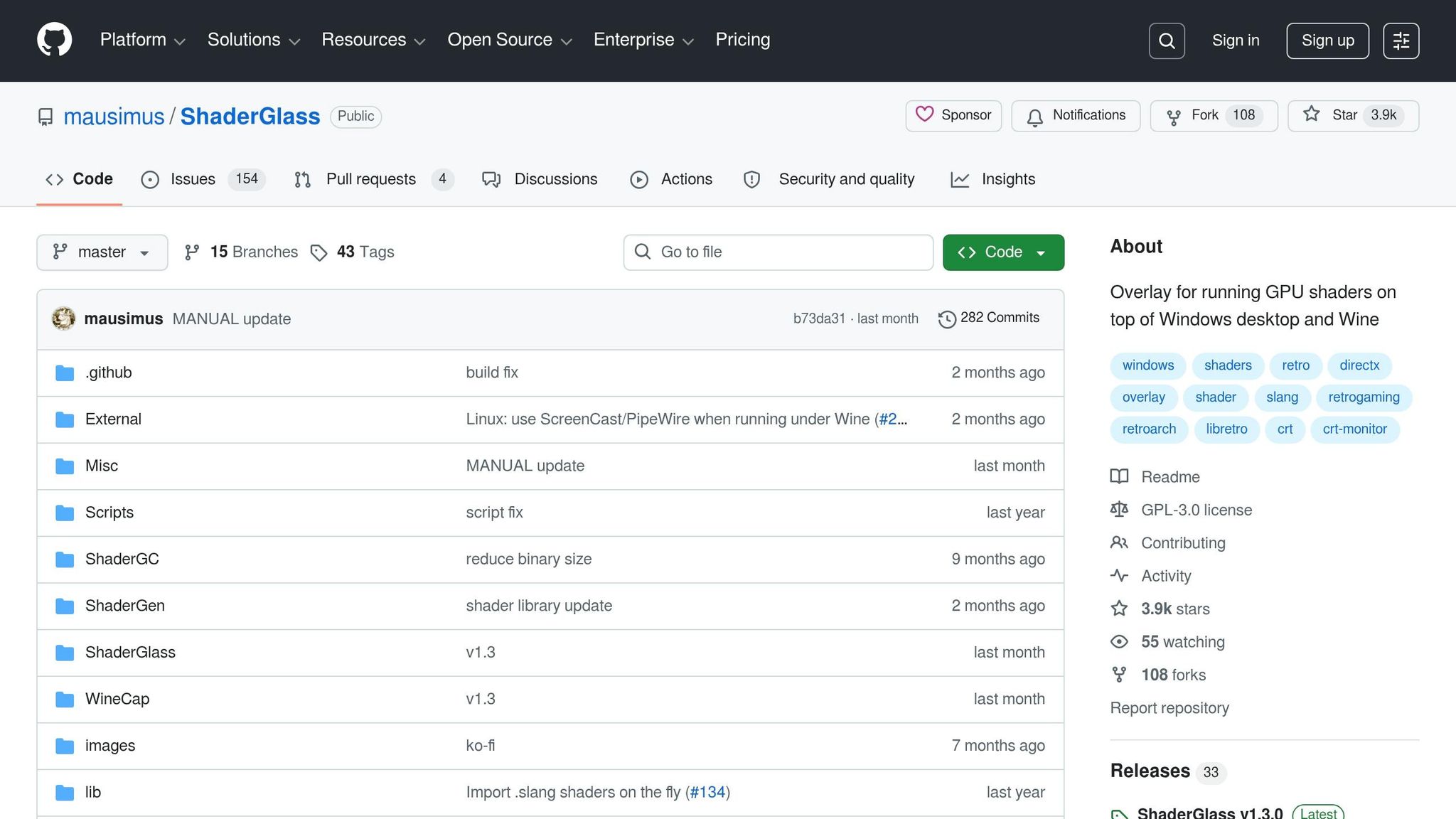
ShaderGlass takes the concept of custom mod enhancements to the next level, letting you apply shaders directly to your desktop in a flexible and intuitive way.
This free, open-source tool uses RetroArch's shader library to bring a variety of effects to any Windows desktop application. Licensed under the GNU General Public License v3.0, ShaderGlass includes over 1,200 shaders sourced from the libretro/RetroArch repository. From CRT simulations and scanlines to VHS-style effects, it offers a vast array of visual options - all without needing RetroArch itself.
Compatibility (Emulators vs. Desktop)
ShaderGlass isn't limited to emulators - it works seamlessly with desktop applications. Compatible with Windows 10 (version 2004 or newer) and Windows 11, it leverages DirectX 11 to apply shaders to any desktop window. It's been tested with popular emulators like DOSBox, FS-UAE, Altirra, ScummVM, AGS, and VICE, as well as creative tools like Aseprite. Starting with version 1.3 (released in March 2026), Linux users can also enjoy ShaderGlass via Wine/Proton, though this requires a desktop environment supporting ScreenCast/PipeWire and is limited to "Clone" mode.
Shader Types
ShaderGlass supports a wide variety of shader categories, offering effects like CRT monitor simulation, scanlines, image upscaling, TV/VHS visuals, handheld console emulation, and post-processing adjustments such as blur, sharpening, denoising, and softening. Users can load complex shaders, tweak their parameters in real time, and even import custom .slang or .slangp multi-pass shaders for added flexibility.
Ease of Setup and Use
The tool offers two modes:
- "Glass" mode: Creates a transparent overlay for applying shaders.
- "Clone" mode: Opens a separate window to display the shader effects, which is better for performance.
On Windows 11, you can disable the yellow security border around captured areas through the screenshot border settings. ShaderGlass has earned a 96% "Very Positive" rating from 389 Steam reviews as of April 2025, with many users highlighting how simple it is to use.
System Requirements
To run ShaderGlass, you'll need:
- Operating System: Windows 10 (version 2004+) or Windows 11
- Processor: Intel Sandy Bridge or AMD Zen (or newer)
- Memory: At least 1 GB of RAM
- Storage: Approximately 100 MB of free space
- Graphics: A DirectX 11–capable GPU
For Linux users running ShaderGlass via Wine/Proton, installing dxvk with winetricks can help improve performance.
3. RetroArch Shaders
RetroArch offers an extensive shader library designed specifically for retro gaming, featuring built-in support for hundreds of GPU-powered visual effects. Unlike CPU filters, shaders leverage your GPU, which helps free up the processor for smoother emulation tasks.
RetroArch supports three shader formats: Slang (optimized for Vulkan, Metal, or Direct3D), GLSL (suited for OpenGL and mobile platforms), and the older Cg, which is now deprecated. For modern PCs equipped with Nvidia or AMD GPUs, using Vulkan as the Video Driver and sticking with Slang shaders is recommended for the best results. This shader system is flexible enough to cater to both beginners and experienced users.
Shader Types
The shader collection in RetroArch covers a wide range of effects, from replicating CRT monitors to mimicking handheld LCD screens. One standout option is CRT-Royale, a highly detailed shader that reproduces phosphor masks and scanlines with impressive accuracy. However, it requires high resolution and a powerful GPU to shine. For users with less powerful hardware, CRT-Pi offers a simplified, single-pass solution that delivers a similar aesthetic on lower-end devices.
Beyond CRT effects, there are interpolation shaders like Pixellate and Sharp-Bilinear, which smooth out pixels during non-integer scaling, avoiding the "shimmering" effect seen during scrolling. NTSC shaders, such as Blargg, recreate the visual quirks of composite video cables, including color bleed and artifacts. Additionally, smoothing shaders like xBR and HQ2x soften pixel edges, giving games a more refined appearance. These shaders are perfect for breathing new life into retro games while staying true to their original charm.
Ease of Setup and Use
Setting up shaders in RetroArch is simple. Press F1 during gameplay, enable "Video Shaders", and select "Load Shader Preset" to explore pre-configured options. For advanced users, the system allows stacking multiple shader passes and tweaking parameters in real time - no need to restart your game.
You can save shader configurations at various levels for convenience: Global (applies to all games), Core (specific emulator), Directory (specific folder), or Game-specific. The system prioritizes the most specific preset, so you can fine-tune the visual effects for individual games without affecting others.
System Requirements
While basic shaders can run on almost any system, more complex options like CRT-Royale demand a dedicated GPU. For devices with integrated graphics, such as Intel HD 4000, enabling "Integrated Graphics Compatibility Mode" can help avoid errors like C6001 or C6002. If you're using low-powered hardware, shaders like crt-pi or zfast-crt are excellent alternatives.
To boost performance with advanced shaders, consider disabling "Runtime Shader Parameters", which allows the GPU to handle static math calculations more efficiently. For users experiencing lag with CRT-Royale, opting for "fake bloom" versions can provide a similar visual effect while significantly improving performance on slower GPUs.
4. S4W - Scanlines for Windows
S4W (Scanlines for Windows) is a real-time CRT shader tool for Windows that works directly within the rendering pipeline of games and emulators or as a fullscreen overlay. Unlike static PNG overlays, S4W uses pixel shaders to apply CRT effects frame by frame, ensuring smooth visuals without shimmer artifacts. The result? Authentic CRT aesthetics that elevate your retro gaming experience.
Compatibility (Emulators vs. Desktop)
S4W is compatible with a wide range of Windows applications, including PC games, emulators, arcade frontends, and even media players like VLC. It supports several graphics APIs - Direct3D 11, Direct3D 9, OpenGL, and GDI for older 2D titles - and runs in exclusive fullscreen mode, eliminating the need for borderless window tricks. Tested on both Windows 10 and Windows 11, this tool is designed to work seamlessly across various setups.
Shader Types
S4W brings a host of effects to the table, such as screen curvature, bloom, phosphor persistence, VHS distortion, tape noise, film grain, flicker, and vignette. It also includes real-time controls for brightness, contrast, saturation, color temperature, gamma, and black levels. With the release of Version 1.2 (April 2026), S4W transitioned from PNG overlays to a pixel shader system, reducing its download size from 482 MB to just 69 MB.
Ease of Setup and Use
"Designed for minimal system resource usage, and built to be as simple and intuitive as possible to use." – S4W
S4W simplifies setup with its Association Profile system, which ties specific executable files to custom CRT profiles. Launch a game, and your preferred shader settings are automatically applied. For emulators, point S4W to your ROM folder, and it will detect running games and apply the right profile. The interface also includes global keyboard shortcuts and options like "start minimized" and "close to tray", ensuring it stays unobtrusive during gameplay. All changes are applied in real time, and you can save custom presets or use the Backup and Restore feature to manage your settings in a single file. If a game doesn’t hook correctly, the auto-generated log file in the "Hook/debug/" folder can help with troubleshooting. These features make S4W a practical addition to any retro gaming setup.
System Requirements
S4W is optimized for low resource usage, making it ideal for older PCs and compact arcade setups. It supports resolutions from 480p to 4K and offers multi-language options, including English, French, German, Italian, Spanish, and Brazilian Portuguese. Available on itch.io as a "Name your own price" download, you can grab it for free or choose to support the developers with a donation. With a 4.8/5 star rating from 13 users, it’s clear that S4W has earned its place in the retro modding community.
5. ReShade CRT Shaders
ReShade takes CRT effects to a new level by offering a universal solution that works beyond dedicated emulators. It operates as a post-processing injector for Windows, allowing advanced CRT shaders to be applied to any desktop game or emulator - even those without native shader support [[17]](https://reshade.me/forum/shader-presentation/6985-introducing -crt-royale-for-reshade). Unlike tools limited to specific platforms, ReShade works seamlessly with DirectX 9, 10, 11, 12, OpenGL, and Vulkan. This makes it compatible with standalone emulators like PCSX2 and Dolphin, as well as modern PC games.
Shader Types
ReShade CRT shaders provide a variety of options, including customizable phosphor masks (aperture grille, slot mask, shadow mask), scanline simulation, and adjustments for screen geometry, such as curvature and tilt [[17]](https://reshade.me/forum/shader-presentation/6985-introducing -crt-royale-for-reshade). To enhance realism, advanced effects like bloom, halation (replicating electron bounce), and refractive diffusion (mimicking light spread through CRT glass) are also available. Some modern ReShade ports even support HDR (High Dynamic Range), enabling shaders like the Sony Megatron to better replicate the brightness and glow of actual CRT phosphors.
Ease of Setup and Use
To use ReShade with complex shaders like crt-royale, you'll need version 4.9 or later [[17]](https://reshade.me/forum/shader-presentation/6985-introducing -crt-royale-for-reshade). The setup is straightforward: download the shader files, copy them to the ReShade folder, and activate them through the in-game interface, which provides real-time feedback. A key tip for optimal performance is to enable V-Sync in your game or GPU control panel. Developer akgunter emphasizes, "V-Sync is essential to simulate scanlines by alternating row rendering" [[17]](https://reshade.me/forum/shader-presentation/6985-introducing -crt-royale-for-reshade). Without it, you might encounter jitter and artifacts that disrupt the effect. Following these steps ensures a smooth and effective shader experience.
System Requirements
For slot mask emulation, a minimum resolution of 1440p is required, though 4K is preferred for the best results. Aperture grille emulation is less demanding and works well on 1080p displays. A discrete NVIDIA or AMD GPU is recommended, and for advanced presets like the CRT Beam Simulator, a refresh rate of at least 120 Hz is necessary, with 240 Hz being ideal.
6. DOSBox Shaders
DOSBox shaders recreate the look of classic CRT displays, giving old-school DOS games an authentic, period-accurate visual style. Some DOSBox versions, like SVN (r4319+), Staging, and ECE, come with built-in shader support. Additionally, tools like ShaderGlass can apply RetroArch-style shaders to DOSBox windows without requiring manual setup.
Shader Types
DOSBox shaders are designed to emulate the visual quirks of CRT monitors while offering additional enhancements for classic PC games. Popular shader options include:
-
crt-geom: Simulates an aperture grille for a classic CRT look. -
crt-lottes: Features horizontal slot masks with a subtle bloom effect. -
zfast_crt: Delivers lightweight scanlines, ideal for less powerful hardware.
Beyond CRT effects, there are shaders like pixel_perfect.glsl, which adjusts aspect ratios using Marat Tanalin's algorithm, and pixellate.glsl, which eliminates shimmering caused by non-integer scaling during scrolling. For smoothing jagged edges in low-resolution games without sacrificing text clarity, the xBR scaler is a strong choice.
Ease of Setup and Use
DOSBox Staging is the easiest to use, thanks to its "zero-config" design. Simply set glshader = crt-auto in the configuration file, and the program will automatically choose the best shader based on the video mode and resolution (ranging from 720p to 4K). As johnnovak from DOSBox Staging notes:
"DOSBox Staging automatically picks the best shader variant based on the current video mode and viewport resolution. High-DPI and displays from 720p to 4k resolutions are fully supported and absolutely no manual configuration is required!"
For DOSBox SVN, setup involves more manual tweaking. You'll need to edit the dosbox-SVN.conf file to configure the output (opengl or openglnb), disable scalers (scaler = none), and specify the shader name (excluding the .glsl extension). Use openglnb for nearest-neighbor scaling or opengl for bilinear filtering. For resolutions up to 640×480, fakelottes is a good choice, while easymode works better for higher resolutions.
These shaders enhance the retro gaming experience without putting a strain on performance.
System Requirements
While DOSBox shaders are designed to be efficient, they do have some hardware requirements. Native GLSL shaders need OpenGL 2.x or newer, which most modern GPUs support. External tools like ShaderGlass require a DirectX 11-capable GPU and Windows 10/11. More demanding shaders, such as CRT-Royale, need higher-end hardware, but "fake bloom" versions offer similar visuals with less GPU power. DOSBox Staging's adaptive shader system works across resolutions from 720p to 4K, with 4K being ideal for achieving detailed phosphor mask effects.
7. Aseprite Normal Toolkit
If you're into retro game modding and want to improve lighting effects, the Aseprite Normal Toolkit is a handy tool. Designed as an extension for the Aseprite sprite editor, it helps create Normal Maps from 2D sprites, making your assets respond to dynamic lighting. Unlike tools that focus on real-time filtering, this toolkit is all about asset creation, giving your sprites a 3D-style lighting effect.
Shader Types (CRT, Scanlines, Lighting, Bezels)
The toolkit specializes in generating Normal Maps - textures that guide shaders on how each pixel is oriented. This allows 2D sprites to react to lighting in a way that mimics 3D objects. However, it’s worth noting that it doesn’t include effects like CRT scanlines or bezels. As developer Mooosik explains:
"A Normal Map is a special texture that tells a shader which direction each pixel of the regular texture is facing".
Using a variation of the Sobel Operator, the toolkit converts grayscale height maps into Normal Maps, ensuring smooth and realistic light interactions. It’s compatible with popular game engines like Unity and GameMaker, making it a great choice for pixel art developers.
Ease of Setup and Use
Installing the toolkit is simple. You can either double-click the .aseprite-extension file or go to Edit > Preferences > Extensions > Add Extension within Aseprite. Once installed, access the tools under Edit > FX > Normal Tools. To get the best results, create a grayscale height map where white represents the highest points and black the lowest.
The toolkit also includes features like "Edge Intensity" to fine-tune sharpness between pixels and a "Mirror Normal Maps" tool to ensure proper lighting direction when flipping maps. It’s a perfect companion for shader and lighting mods, giving you precise control over asset creation.
System Requirements
To use the toolkit, you’ll need Aseprite version 1.3 or higher. It works on Windows, macOS, and Linux, and you can download it from itch.io under a "name your own price" model - essentially making it free. With a 5.0-star rating from 13 reviews, users have praised it as "amazing" and a great addition for pixel art workflows. However, avoid using it on Aseprite’s built-in Tilemap Layers, as this may lead to crashes.
Tool Comparison Table
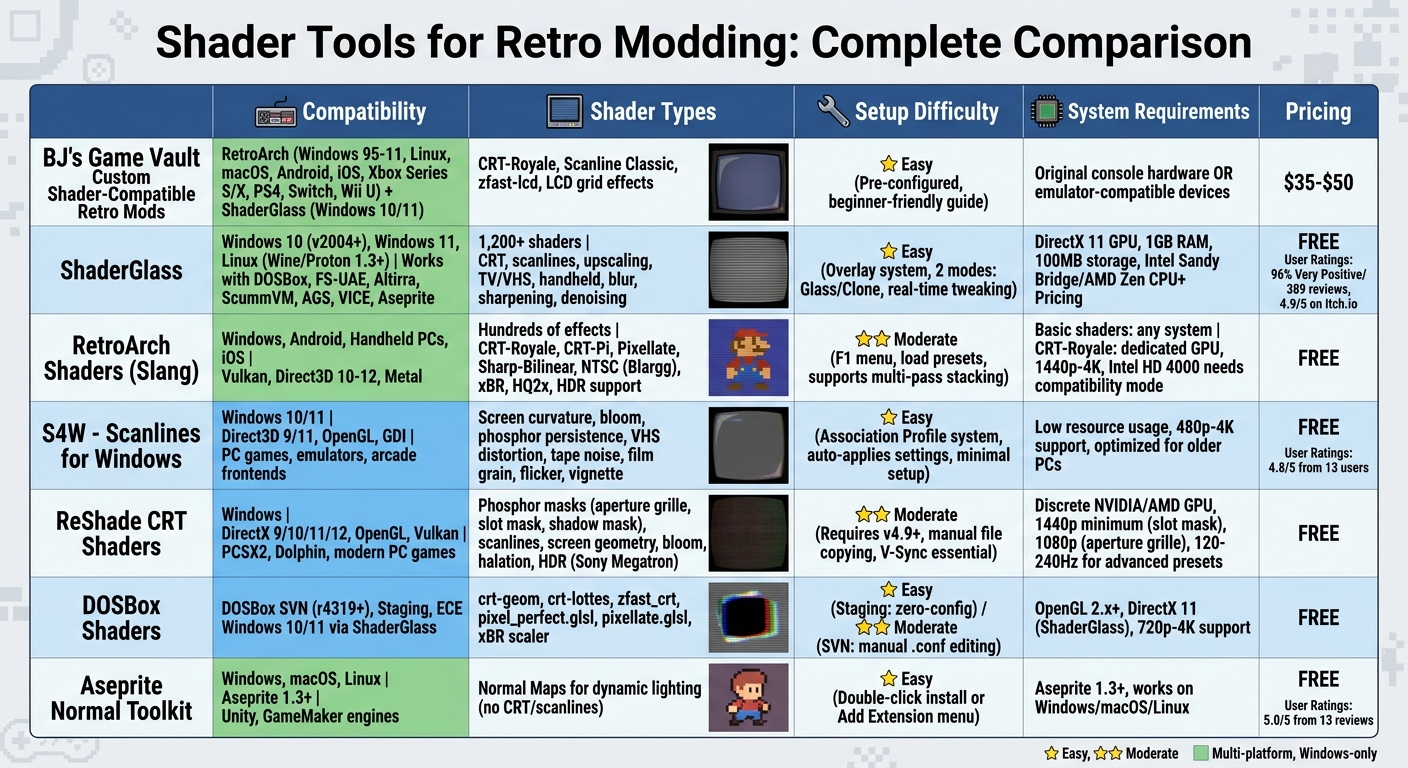
Shader Tools for Retro Gaming: Feature Comparison Chart
Evaluate each tool by compatibility, shader types, setup difficulty, and system requirements.
| Tool | Compatibility | Shader Types | Setup Difficulty | System Requirements |
|---|---|---|---|---|
| BJ's Game Vault Custom Shader-Compatible Retro Mods | NES, SNES, Sega Genesis, N64, GBA custom cartridges | Pre-configured CRT, Scanlines | Low (Pre-installed) | Original console hardware |
| ShaderGlass | Windows 10 (v2004+), Windows 11, Linux (Wine/Proton 1.3+) | CRT, Upscaling, TV/VHS, Handheld, 1,200+ built-in shaders | Easy (Overlay) | DirectX 11-capable GPU; Windows 11 recommended |
| RetroArch (Slang) | Windows, Android, Handheld PCs, iOS | CRT, Handheld (LCD), Interpolation, HDR | Moderate | Vulkan, Direct3D 10–12, or Metal support |
| RetroArch (GLSL) | Low-power Linux handhelds, Mobile | CRT, Handheld, Interpolation | Moderate | OpenGL support |
These comparisons help modders choose tools that elevate retro visuals while maintaining system efficiency. The summary reflects how each tool stands out in its respective area, offering a range of options tailored to different setups.
ShaderGlass, for example, is particularly notable for functioning as a transparent overlay for any windowed app, from DOSBox to ScummVM and even YouTube. However, it does come with a slight performance trade-off: about 20% CPU and 15% GPU usage. As Samarveer Singh of XDA-Developers remarked:
"ShaderGlass has rewired the way I look at my game library. It may come off as a quirky tool to some, but once you find the right combination of shader and game, there's genuinely no going back".
RetroArch's Slang shaders, on the other hand, shine on systems equipped with Vulkan or Direct3D 11/12 support. The platform's presets adapt to various devices, but advanced shaders like CRT-Royale demand more powerful GPUs. For users with Intel HD 4000, manually selecting "crt-royale-intel.cgp" can prevent crashes.
ShaderGlass has received a 4.9/5 rating from 224 Itch.io users. While it performs well overall, minor issues have been noted on older CPUs or during window resizing. Windows 11 users enjoy a borderless overlay mode, though Windows 10 users may encounter a persistent yellow border.
Conclusion
In the world of retro modding, shaders act as the perfect bridge between classic visuals and modern display technology. Tools like CRT-Royale recreate the look of vintage CRT monitors with precise phosphor masks and scanlines, delivering that nostalgic pixel-perfect feel. Meanwhile, ShaderGlass makes it effortless to apply over 1,200 shaders to any windowed application - whether you're reliving DOSBox classics or just watching YouTube. RetroArch continues to be the cornerstone of shader modding, offering free, cross-platform support for GLSL and Slang formats. Specialized tools such as DOSBox Shaders and Aseprite Normal Toolkit also cater to niche needs, from DOS fans to sprite artists.
These tools provide incredible flexibility, allowing users to layer multiple shaders, tweak brightness, and even adjust screen curvature in real time. Whether you're gaming on a compact handheld device or a high-performance 4K setup, there's a shader solution tailored to your needs.
For collectors wanting a seamless retro experience, BJ's Game Vault offers custom cartridges and NES ROM hacks, typically priced between $35 and $50. These cartridges are designed to work harmoniously with advanced shaders, featuring custom color palettes and LCD grid effects. Ben Jelter (Jeltron), a Game Boy Color developer and key figure in the shader community, has played a pivotal role in refining these tools for handheld visuals. Combined with these advanced shaders, BJ's Game Vault provides a polished and hassle-free way to enhance your retro gaming journey.
Dive into RetroArch and ShaderGlass for free and breathe new life into your favorite retro games.
FAQs
Which shader tool should I start with?
RetroArch is a fantastic starting point for retro game shader modding. It offers a wide variety of shaders and is highly regarded in the gaming community. Its interface is easy to navigate, making it an excellent choice for beginners who want to experiment with shaders and lighting effects in retro games.
What hardware do I need for CRT shaders like CRT-Royale?
To use CRT shaders like CRT-Royale without performance issues, you'll need a modern graphics card. Discrete GPUs from Nvidia or AMD are ideal for handling the shader's demanding processing requirements. Integrated GPUs, such as those from Intel, often struggle with the shader's complexity and may not be compatible.
Why do scanlines look wrong or jittery on my display?
Scanlines might look off or appear jittery if there are problems with shader settings, mismatched screen aspect ratios, or refresh rate conflicts with your display. To fix this, tweak these settings to match your device's specifications. For guidance, check out shader configuration resources tailored for retro devices to ensure everything is set up correctly.