


Checklist for Playing ROM Hacks as a Beginner
Want to dive into ROM hacks but don't know where to start? Here's a quick guide:
-
What You Need:
- A clean base ROM (original game file).
- A patch file (.ips, .bps, .ups, etc.).
- An emulator to run the game.
-
Steps to Get Started:
- Check Compatibility: Ensure your device (PC, Mac, Android, iOS, or retro handheld) can handle emulators.
- Choose an Emulator: Use reliable options like mGBA (GBA), Snes9x (SNES), or RetroArch for multiple systems.
- Get the Right ROM: Verify the ROM version (region and hash) matches the patch instructions.
- Patch the ROM: Use tools like Lunar IPS (Windows) or MultiPatch (Mac) to merge the patch with the ROM.
- Test the Game: Load the patched ROM in your emulator to ensure it works.
-
Tips for a Smooth Experience:
- Organize ROMs by system and use consistent naming.
- Set up BIOS files if needed (e.g., for PlayStation or Sega CD).
- Use emulator features like save states, fast-forward, and cheats to enhance gameplay.
-
Beginner-Friendly Hacks:
- Pokémon hacks like Glazed or Light Platinum.
- SNES classics like Hyper Metroid or Super Mario World hacks.
-
Physical Options:
- Create custom cartridges with services like BJ's Game Vault to play on original hardware.
Key Takeaway: With the right tools and preparation, ROM hacks can transform your retro gaming experience. Follow this checklist to avoid common pitfalls and start playing today.
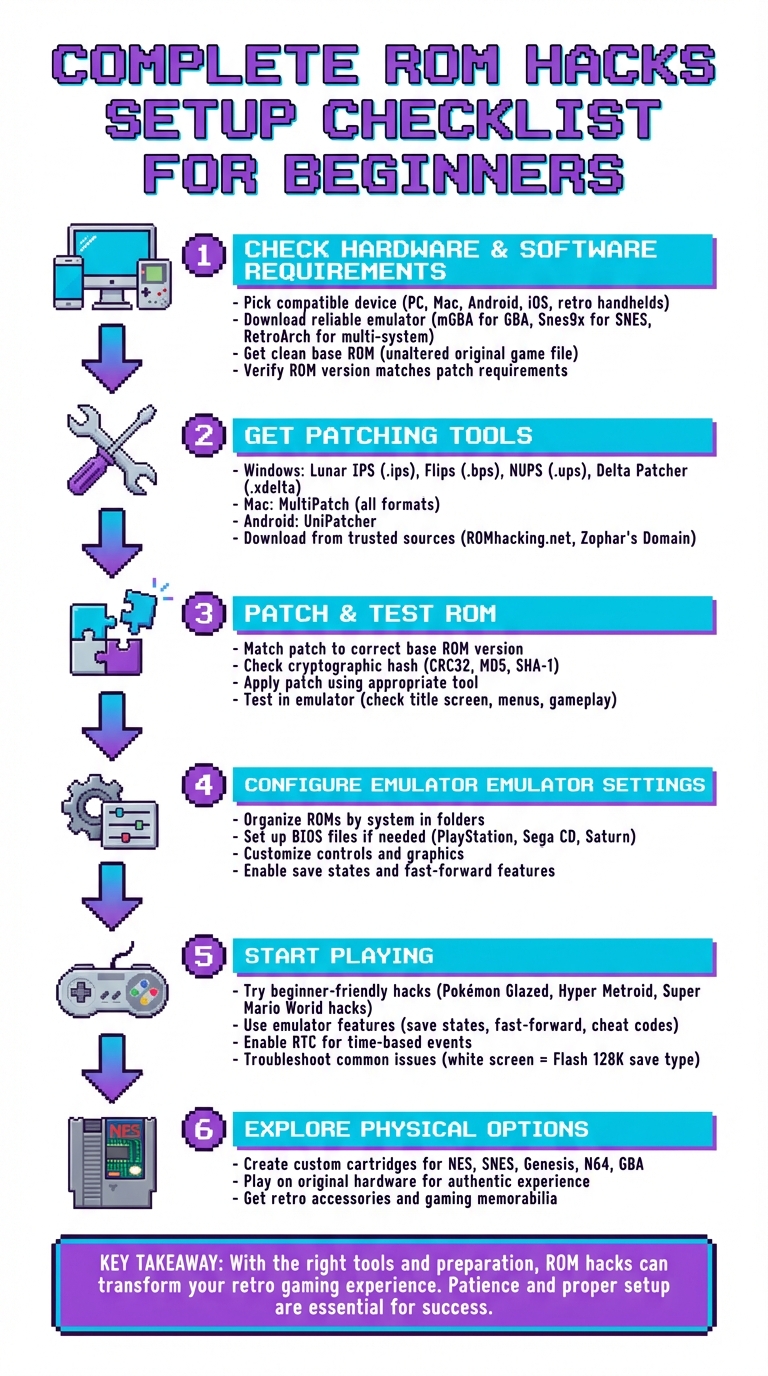
ROM Hacks Beginner Setup Guide: 6-Step Process from Download to Play
Step 1: Check Your Hardware and Software Requirements
Pick a Compatible Device
You’ll be glad to know that most modern devices - whether it’s a PC, Mac, Android, or iOS device - can handle ROM hacks. Retro handheld consoles like the Retroid Pocket Mini and RG406V are also up to the task. Even Chromebooks from 2017 onward, as long as they have Play Store access, can run emulators without much trouble.
For older systems like the NES, SNES, Genesis, Game Boy, and GBA, nearly any device will work. If you’re looking to emulate systems like PlayStation 1, N64, Saturn, Dreamcast, or PSP, a mid-range smartphone or computer will do just fine. However, for more demanding systems, like the PS3 or Nintendo Switch, you’ll need a higher-end setup - think 8–16 GB of RAM and a GPU that supports OpenGL 4.5 or Vulkan. As of April 2024, Apple has officially started allowing video game emulators in the iOS App Store, making it easier for iPhone and Apple TV users to dive into ROM hacks.
Once your hardware is ready, the next step is choosing the right emulator.
Download a Reliable Emulator
Standalone emulators are a great choice for beginners since they’re straightforward to set up. For GBA hacks, mGBA is a solid pick for PC users, while Android users can try Pizza Boy GBA. If you’re on an iPhone, Delta is a versatile option that supports Game Boy, GBA, and even DS games. For SNES titles, Snes9x is a reliable choice for PC.
If you’re managing games across multiple systems, consider an all-in-one emulator like RetroArch. It allows you to organize and play games from different consoles in one place, though its menus can feel a bit overwhelming at first.
One thing to keep in mind: avoid outdated emulators like the original VisualBoyAdvance, as they may not work well with modern ROM hacks. On Windows, save yourself some headaches by installing emulators in folders like Documents or Downloads, rather than restricted system folders, to ensure your saves work properly.
With your emulator ready, the next step is finding the correct base ROM.
Get Clean Base ROMs
For ROM hacks to work, you’ll need an unaltered, original ROM file. Hacks are distributed as small patch files that tweak specific parts of the original game. Using a modified or incorrect version of a ROM can cause checksum errors and glitches.
For example, many Pokémon hacks require the Pokémon FireRed version 1.0 ROM. To make sure you’re using the right one, check its cryptographic hash (CRC32, MD5, or SHA-1) against the details provided by the hack’s creator. You can use online tools like ROM Patcher JS to quickly verify your ROM’s checksum and confirm you’ve got the right version. If you’re dumping ROMs yourself, you’ll need specialized hardware to extract them from cartridges or discs you own.
Step 2: Get the Tools You Need for Patching
Download Patching Software
To start patching ROMs, you'll need specific tools to merge patch files (like .ips, .bps, .ups, or .xdelta) with a clean base ROM. These tools make it possible to apply hacks and create your modified game.
For Windows users, Lunar IPS is an excellent choice for handling .ips files. It's lightweight (just 58.4 KB) and easy to use. If you're working with .bps files, Floating IPS (Flips) is highly reliable. For .ups patches, go with NUPS, and for .xdelta files (commonly used with disc-based systems), Delta Patcher is a dependable option.
On Mac, MultiPatch is the go-to tool. It supports a range of formats, including IPS, BPS, UPS, and xDelta, making it an all-in-one solution. Android users can rely on UniPatcher, which works directly on mobile devices, while iOS users can turn to the web-based ROM Patcher JS.
Once you’ve set up your system and secured a clean ROM, these tools will be essential for merging patches and bringing your custom game to life.
| Patch Format | Windows Tool | Mac Tool | Android Tool |
|---|---|---|---|
| .ips | Lunar IPS | MultiPatch | UniPatcher |
| .bps | Flips | MultiPatch | UniPatcher |
| .ups | NUPS | MultiPatch | ROM Patcher JS |
| .xdelta | Delta Patcher | MultiPatch | UniPatcher |
Make sure to download these tools from trusted sources like ROMhacking.net or Zophar's Domain to avoid malware. Once your patching tools are ready, the next step is finding reliable ROM hack patches.
Find ROM Hack Patches
To locate ROM hack patches, start with well-known community hubs like ROMhacking.net, which hosts a massive collection of hacks for various systems. For specific games, you can explore specialized sites such as SMW Central for Super Mario World and SNES hacks, PokéCommunity for Pokémon hacks, or FEUniverse for Fire Emblem hacks.
Patches are often compressed in formats like .zip, .7z, or .rar. Use tools like 7-Zip (for Windows) or The Unarchiver (for Mac) to extract the files. After extraction, check the included README file for important details about the patch, such as the required ROM version, region (e.g., USA, Japan, or Europe), and revision number (e.g., v1.0 or v1.1).
Always back up your clean base ROM before applying a patch. Patching permanently alters the ROM file, so keeping an untouched copy ensures you can start fresh if needed.
Step 3: Patch and Test Your ROM Hack
Match the Patch to the Correct Base ROM
Make sure your base ROM matches the exact version the hack developer specifies. You’ll typically find this information in the ReadMe file or on the hack’s description page on ROMhacking.net. Look for details like the game title, region (e.g., USA/U, Europe/E, or Japan/J), and version (such as v1.0 or v1.1).
To confirm your ROM is the correct version, check its cryptographic hash (CRC32, MD5, or SHA-1) using an online tool like ROMhacking.net's Online ROM Hasher. For instance, the MD5 checksum for Pokémon FireRed (USA, version 1.0) should be e26ee0d44e809351c8ce2d73c7400cdd. If your hash doesn’t match, you’re working with the wrong version, and the patch won’t work.
For SNES games, it’s also important to verify whether your ROM has a header, as some patches require a specific header status. Tools like TUSH or SNES ROM Utility can help you strip the header if needed. Modern patching tools, such as ROM Patcher JS or Flips, will often detect checksum mismatches and alert you before applying the patch.
Once you’ve confirmed everything matches, open your preferred patching software.
Apply the Patch
Start by launching your patching tool, loading the patch file, and selecting your clean ROM. The type of patch file determines which tool you’ll need:
- Use Lunar IPS on Windows or MultiPatch on Mac for .ips files.
- Use Floating IPS (Flips) for .bps files.
Click “Apply” or “Patch,” and the software will generate a modified version of your ROM.
"Patching will usually fail if you recently modified the GBA ROM file. For a successful file patching, you need a clean ROM." - PokeCoder
Keep a backup of your original ROM file. Patching permanently changes the file, but many tools allow you to save the modified version under a new name, preserving your untouched base ROM.
Test the Patched ROM
Now it’s time to test your patched ROM. Load it into an emulator - mGBA works well for Game Boy games, while Snes9x is a solid choice for SNES titles. If the game boots to the title screen and menus function properly, the patch was likely successful. Play for a few minutes to ensure everything runs smoothly.
If you encounter a black or white screen, chances are the ROM version doesn’t match the patch requirements. For SNES games, try re-patching after removing the header from a fresh ROM. You might also see a "Bad Checksum" message; however, you can usually ignore it if the game starts and runs correctly.
"As long as the game starts up normally after this [Bad Checksum] message, everything is fine and nothing is broken or corrupted." - FantasyAnime
For Pokémon hacks, remember to configure the emulator to use "Flash 128K" as the save type and enable RTC (Real-Time Clock) to avoid start-up problems.
Step 4: Configure Emulator Settings for Better Gameplay
Organize Your ROM Library
Start by creating a central "Emulation" folder on your computer, then divide it into subfolders for each system - like /NES, /SNES, /PS1, and /GBA. To keep things tidy, use standard naming codes to identify ROM versions: (U) for United States, (E) for Europe, (J) for Japan, and [!] for a verified "Good Dump." If you're using soft patching, make sure the ROM and its patch have the same filename and are in the same folder. For older 8-bit and 16-bit games, you can leave the ROMs in their ZIP files to save space - most emulators can run them directly without extraction. For CD-based games, converting them to the CHD format is a smart choice, as it reduces file size and improves compatibility.
Once your ROM library is organized, the next step is setting up your BIOS files to ensure everything runs smoothly.
Set Up BIOS Files (If Needed)
Certain systems, like the Sega CD, PlayStation, and Sega Saturn, require BIOS firmware to function properly. Others, like the Game Boy Advance or GameCube, treat BIOS files as optional but can benefit from them. Place the required BIOS files in the designated "bios" or "system" folder of your emulator, following the specific folder structure your emulator requires.
| System | Required BIOS Examples | Notes |
|---|---|---|
| PlayStation (PSX) |
scph5501.bin (US), scph5502.bin (EU) |
Required for most emulators |
| Sega CD |
bios_CD_U.bin (US), bios_CD_J.bin (JP) |
Use the BIOS file that matches your region |
| Game Boy Advance | gba_bios.bin |
Optional; adds a startup logo |
| Sega Saturn |
mpr-17933.bin (US/EU) |
Required for the Beetle Saturn core |
One important note: BIOS filenames can be case-sensitive, especially when running emulators on Linux-based systems like the Steam Deck. Double-check that each filename matches exactly what your emulator expects.
Once your BIOS setup is complete, you can move on to tweaking controls and graphics for a better gaming experience.
Customize Controls and Graphics
To make your gameplay feel authentic, remap the controls to match the original console layout. Using a USB controller is a great way to replicate the feel of the classic systems. For visuals, many emulators let you apply screen filters or shaders to improve how low-resolution graphics look on modern displays. If you're playing older games, save states are a lifesaver - they let you save and load your progress at any point, which is especially handy for difficult sections or custom ROM hacks. Some emulator cores even offer widescreen enhancements for systems like the SNES or Sega Genesis, giving classic games a modern twist.
sbb-itb-9a4764e
Step 5: Start Playing Beginner-Friendly ROM Hacks
Begin with Recommended ROM Hacks
With your setup complete - hardware, software, and patched ROM - it’s time to dive into beginner-friendly ROM hacks. If you’re a Pokémon fan, start with popular titles like Pokémon Glazed, Light Platinum, Ash Gray, Pokémon Gaia, or Adventures Red Chapter. For Metroid enthusiasts, Hyper Metroid is a great SNES hack to get started with. TMNT lovers can check out Teenage Mutant Ninja Turtles: Shredder's Re-Revenge, a clever hack of Streets of Rage 2. You can find these and more on trusted platforms like ROMhacking.net or community hubs such as PokemonCoders and Metroid Construction.
Make Use of Emulator Features
Emulators come packed with features that can make your experience smoother and more enjoyable. Here are some key tools to take advantage of:
- Save States: These let you save your progress at any point, perfect for tackling tough sections or dealing with unstable hacks.
- Fast-Forward: Skip through repetitive grinding or lengthy dialogues with this time-saving feature.
- Cheat Codes: Many hacks support GameShark or Action Replay codes. Just remember, most cheats require an active "Mastercode" to work.
- Real-Time Clock (RTC): Enable this for games with time-based events, like Pokémon Emerald hacks. Without it, certain features or even the game itself might freeze.
For Android users, the My Boy! emulator has an auto-patching feature. This handy tool applies the hack automatically if the base ROM and patch file are located in the same folder.
If you encounter any issues while playing, don’t worry - there are solutions for common problems.
Troubleshoot Common Problems
Crashes and errors can happen, but most are easy to fix. Here’s how to handle some of the most frequent issues:
- Fast-Forward Crashes: If the game crashes during fast-forward, lower the speed to around 150% to avoid audio buffer issues.
- White Screen or "1M Sub-Circuit Board" Error: This usually means you need to set your emulator’s save type to "Flash 128K" for GBA Pokémon hacks.
-
Freezing at the Nintendo Logo: Delete any existing
.savfile from an earlier version of the game or check your BIOS settings. - Version Mismatches: Always verify that your ROM matches the required version for the hack. Using the wrong version - like 1.1 instead of 1.0 - is one of the most common causes of crashes and patching errors.
If you’re planning to use cheats, stick with "V1.0" versions of base ROMs, as many cheat codes won’t work with later revisions like "V1.1". By keeping these tips in mind, you’ll be ready to enjoy your ROM hacks without unnecessary frustration.
How to Patch and Play Rom Hacks on ANY Device
Step 6: Explore Physical Options at BJ's Game Vault

If you're looking for ways to take your ROM hack experience beyond emulation, BJ's Game Vault has some exciting physical options to consider.
Custom Cartridges for Classic Consoles
BJ's Game Vault specializes in creating custom cartridges for systems like the NES, SNES, Sega Genesis, N64, and GBA. These cartridges are designed to deliver smooth, authentic gameplay with the added bonus of lower latency. Plus, there's something undeniably satisfying about playing on original hardware - it’s a nostalgic trip back in time. Cartridge creator phantonomy perfectly captures this sentiment, emphasizing how playing on original hardware offers an unmatched experience.
Before purchasing, make sure your console supports any special features your ROM hack might need. For instance, some Pokémon hacks rely on Real-Time Clock (RTC) functionality for time-based events, while others might require high-quality flash memory to save progress securely after major achievements, like conquering the Elite Four.
Turn Your ROM Hack Into a Custom Cartridge
Ever wanted to see your favorite ROM hack come to life as a physical cartridge? BJ's Game Vault can make that happen. Just provide them with the ROM file, and their team will flash it onto a compatible cartridge board. These custom cartridges are compatible with original handheld systems like the GBA and GBA SP, as well as newer devices like the Analogue Pocket. For collectors, there's also the option to upgrade with replacement shells and professionally printed labels, adding a polished, display-worthy touch.
Retro Accessories and Gaming Memorabilia
BJ's Game Vault doesn’t stop at cartridges. They also stock a variety of retro gaming accessories and collectibles. From controllers and replacement shells to adapters for classic and modern consoles, they've got you covered. On top of that, you’ll find plush toys inspired by beloved gaming characters, fan-made creations, and other video game-themed memorabilia to round out your collection. Whether you're a player or a collector, there's plenty to explore.
Conclusion
By following this checklist - covering everything from emulator setup to patch testing - you can sidestep many common challenges and enjoy a smoother ROM hacking experience.
As InVerse from RomHack Plaza wisely states, "Above all else, a ROM hacker must be patient. Without patience, you won't accomplish much. The work is often tedious and boring, but if you stick it out, you'll be highly rewarded." Patience truly is the cornerstone of success in ROM hacking.
Starting with simpler projects, like NES or Game Boy hacks, is a great way to gain confidence and gradually sharpen your technical skills.
Both digital and physical approaches offer unique rewards. Whether you enjoy the convenience of emulators or the nostalgic charm of original hardware, there’s a method suited to every retro gaming fan. Modern web-based patchers make the process even easier, complementing the streamlined steps outlined here. For those who prefer physical options, services like BJ's Game Vault provide ready-to-play custom cartridges, retro gaming accessories, and even custom game creation.
Over the past two decades, the ROM hacking community has refined its craft, creating a vibrant remix culture that often enhances the original games. Armed with the right tools and a healthy dose of patience, you're ready to explore this creative world and rediscover retro gaming in ways the original developers could never have imagined.
FAQs
What are some great ROM hacks for beginners to try?
If you're just stepping into the world of ROM hacks, some great starting points include Pokémon Glazed, Pokémon Light Platinum, and Pokémon Gaia. These fan-created games are celebrated for their captivating stories, smooth gameplay, and beginner-friendly design.
They offer a fresh spin on the classic Pokémon experience, making them easy to enjoy whether you're reliving old memories or diving into these adventures for the first time. These titles are an excellent way to ease into the ROM hacking scene.
How can I make sure my emulator works with my ROM or ROM hack?
To make sure your emulator works seamlessly with a ROM or ROM hack, start by identifying the ROM’s original console and file type (like .nes for NES or .gba for Game Boy Advance). Then, pick an emulator that supports that specific system. If the emulator doesn’t mention compatibility with the console or file type, the ROM won’t work properly.
Next, confirm the ROM’s region and version. Games are often released in formats like NTSC (U.S.) or PAL (European), and some hacks are tailored to specific versions, such as “U.S. v1.0.” Using the wrong version can cause crashes or glitches. It’s also a good idea to verify the ROM’s integrity by comparing its checksum to the one provided with the hack. A matching checksum confirms you’re working with the correct base ROM.
Once you’ve got the right ROM, use a patching tool (like IPS or UPS patchers) to apply the hack. After patching, load the modified file in your emulator. If you run into issues like freezing or graphical bugs, try switching to a different emulator or an updated version. For the smoothest experience, check the hack’s documentation, as it often recommends emulators that work best with the hack.
What can I do if my patched ROM isn’t working?
If your patched ROM isn’t running as expected, here are some practical steps to help you sort things out:
- Verify the base ROM version: Patches are often tailored for specific ROM versions, like Pokémon FireRed v1.0. Using the wrong version or region can lead to errors. Always ensure you’re working with the correct, unmodified ROM.
- Check patch and tool compatibility: The patch format (e.g., IPS, UPS, BPS) must match the patching tool you’re using. If they’re mismatched, try reapplying the patch with a tool that supports the correct format.
- Use a clean ROM: If you’re encountering issues, delete the patched file and start over with an unmodified ROM. Errors often occur when the patching process is applied to a file that’s already been altered.
- Try a different emulator: Not all emulators handle patched ROMs the same way. If one emulator isn’t working, test the ROM on another reliable option like mGBA or RetroArch.
If you’re still running into problems, look for common signs like a blank screen (which often points to the wrong ROM version) or save issues (usually tied to emulator settings). For tougher cases, consider reaching out to the ROM hacking community. Share details about your ROM, the patch, and any error messages - you’ll likely find helpful advice. With some persistence, you’ll have your ROM hack running as intended!