

How PAL and NTSC Affect Game Speed
Retro games often run at different speeds depending on the region, thanks to two video standards: NTSC (60 Hz refresh rate) and PAL (50 Hz refresh rate). NTSC, used in North America and Japan, delivers smoother gameplay, while PAL, common in Europe and Australia, slows games down by about 17% when not optimized. This affects everything from character movement to music tempo.
Key takeaways:
- NTSC runs at 60 fps, offering faster gameplay.
- PAL runs at 50 fps, causing slower gameplay and lower-pitched audio in unoptimized games.
- PAL systems have higher resolution (576 lines vs. NTSC’s 480), but many games left black borders instead of using the extra space.
Examples:
- Sonic the Hedgehog on PAL systems runs slower than its NTSC counterpart.
- Super Mario Bros. had adjusted music speeds for PAL, but gameplay still felt different.
Solutions include hardware mods, emulation tweaks, or using fan-made ROM hacks to restore original game speeds. Custom cartridges also allow retro gamers to experience games as they were meant to be played. If you are new to this, follow a ROM hack checklist to get started safely.
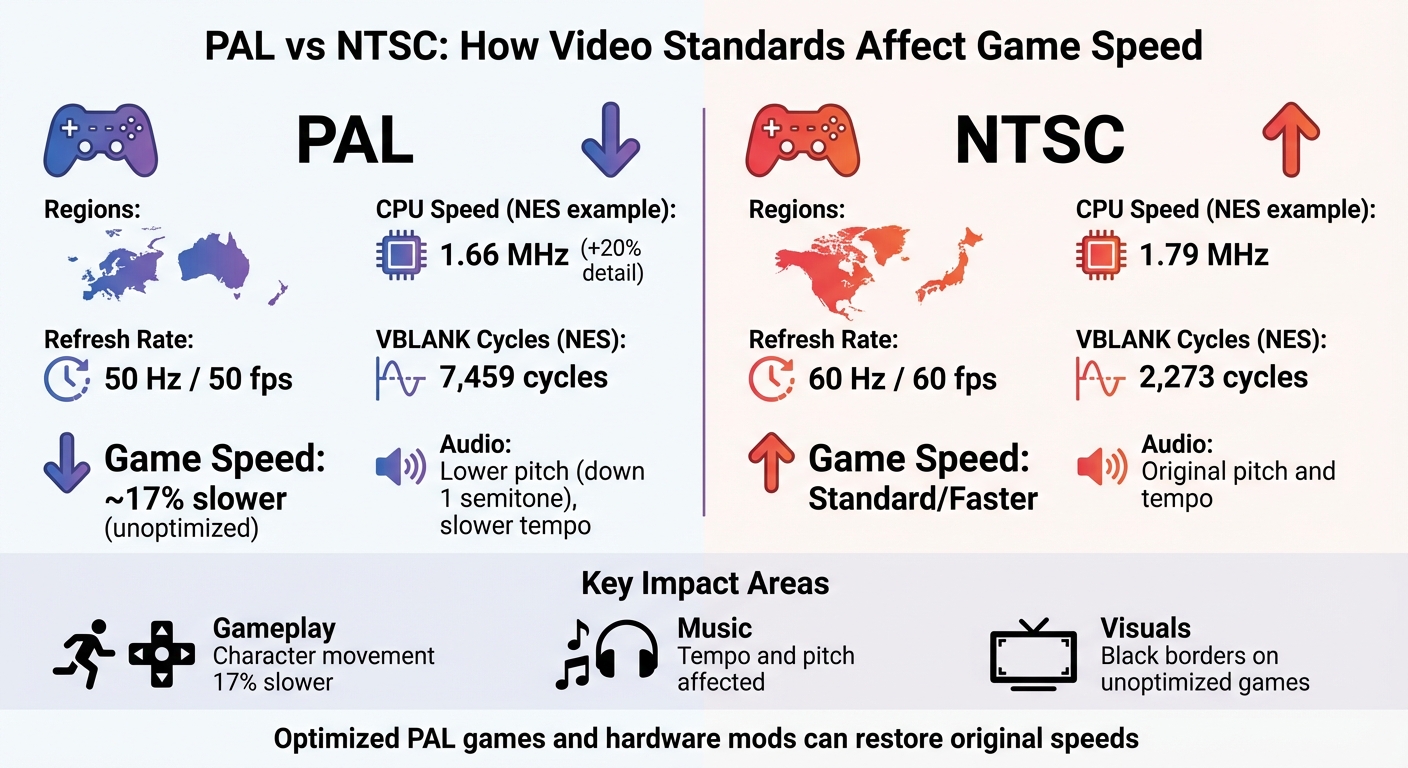
PAL vs NTSC Gaming Standards Comparison Chart
How PAL and NTSC Standards Affect Game Speed
Technical Differences Between PAL and NTSC
The main distinction between PAL and NTSC systems lies in their refresh rates. NTSC systems refresh at 60 frames per second (fps), while PAL systems refresh at 50 fps. This difference often causes slower gameplay in PAL versions of unoptimized games because many classic consoles tied game logic directly to the screen's refresh rate, though some modern region free cartridges support both NTSC and PAL formats. Without adjusting the code during a port from NTSC to PAL, the result was a noticeable drop in performance speed.
Another factor is the CPU clock speed. For example, the NTSC NES runs at 1.79 MHz, whereas the PAL version operates at about 1.66 MHz. PAL systems also featured longer vertical blanking intervals (VBLANK). On the NES, PAL systems provided approximately 7,459 CPU cycles during VBLANK compared to 2,273 cycles on NTSC systems. This gave developers more time to update graphics during VBLANK if they optimized for PAL.
PAL systems did offer a higher vertical resolution, with 576 visible lines compared to NTSC’s 480. This increased resolution could provide 20% more detail. However, many unoptimized ports didn’t take advantage of this, leaving large black borders at the top and bottom of the screen.
These technical differences also had a direct effect on audio and visual elements.
Effects on Music and Visuals
The slower refresh rate of PAL systems didn’t just affect gameplay speed - it also impacted audio and visuals. Since audio playback was synced to the screen refresh, unoptimized PAL games often had music that played slower and at a lower pitch, typically dropping by about one semitone.
A clear example of this is the PAL version of Sonic the Hedgehog on the Sega Genesis, which featured both slower gameplay and music compared to the NTSC version. On the other hand, Nintendo took a different approach with the PAL release of Super Mario Bros. for the NES. To address the timing mismatch, they sped up the audio engine. The sound engine tracked time in whole frames, so developers had to decide between a slower tempo (around 83.33 bpm) or a faster one (125 bpm) to replace the NTSC original’s 100 bpm. This resulted in PAL music playing faster than the NTSC version.
Visual effects and animation also suffered due to the reduced frame rate. For instance, Wave Race 64 on the Nintendo 64 ran slower in PAL regions, making movements feel less fluid and responsive.
sbb-itb-9a4764e
Why is Sonic Faster in America? NTSC vs PAL/60Hz vs 50Hz | Nostalgia Nerd
Game Speed Differences in PAL and NTSC Versions
Hardware differences between PAL and NTSC systems created noticeable gameplay variations in many classic games.
NES and SNES Games
The 50 Hz refresh rate of PAL systems required developers to get creative, leading to notable differences in performance for Nintendo's 8-bit and 16-bit classics. Games like Super Mario Bros., Kirby's Adventure, Super Mario Bros. 3, DuckTales, and Zelda II: The Adventure of Link had their physics and audio timing adjusted to account for the slower refresh rate.
On the SNES, Super Mario World shows an interesting compromise. While both gameplay speed and music were adjusted for PAL systems, Mario actually moves slightly faster compared to the NTSC version. However, this came at the cost of large black borders surrounding the screen, as developers didn’t fully utilize the PAL system's higher vertical resolution. Similar adjustments can be found in games on other platforms, including the Genesis and PlayStation.
Sega Genesis Games
The Sega Genesis faced even greater challenges with PAL conversions. A clear example is Sonic the Hedgehog 1, where unoptimized PAL versions ran nearly 17–20% slower than their NTSC counterparts. Since most Genesis games were developed with the NTSC 60 Hz standard in mind, these slowdowns were a common issue across the system's library.
PS1 and PS2 Games
The PlayStation era brought its own set of problems. Many games, especially those from Square (now Square Enix), suffered from poor PAL conversions. These versions often experienced noticeable slowdowns and featured large black borders at the top and bottom of the screen. By the early 2000s, things began to improve with consoles like the Dreamcast, PS2, and GameCube offering "PAL-60" modes. This allowed games to run at NTSC's 60 Hz refresh rate while retaining PAL's color encoding.
How to Fix PAL and NTSC Speed Differences
Tackling the speed differences between PAL and NTSC systems requires a mix of hardware tweaks and software adjustments. Retro gamers can choose from several approaches depending on whether they’re working with original hardware, emulators, or custom cartridges.
Hardware Modifications for Retro Consoles
One popular solution for PAL consoles is adding a 50/60 Hz switch, which restores NTSC game speed. For example, modifying SNES consoles (2/3-chip models) involves adjusting specific PPU pins to toggle between 50 Hz and 60 Hz modes.
On the PS2, modchips can bypass BIOS restrictions to force a 60 Hz output. However, before diving into hardware mods, check if your display supports 60 Hz signals - some older PAL-only TVs might flicker or lose sync when forced to 60 Hz. If you’re importing NTSC hardware into PAL regions, remember that consoles with internal power supplies, like the PS1, Saturn, or Dreamcast, often require step-down transformers to avoid damage.
If hardware modifications aren't your thing, emulation offers a less invasive alternative.
Emulation Settings and ROM Hacks
Emulators provide a straightforward way to address speed issues without any soldering. Most modern emulators include options to force 60 Hz output for PAL ROMs or automatically adjust based on the game’s region. Tools like Open PS2 Loader (OPL) and FreeMcBoot (FMCB) allow users to access system-level settings to manually select NTSC/60 Hz as the default output.
Whenever possible, stick to NTSC ROMs, as they run at the intended 60 Hz speed without requiring adjustments. For fans of physical hardware, custom games on original consoles or natively optimized releases may be the best choice. BJ’s Game Vault offers rare ROM hack cartridges that include speed corrections, letting you enjoy optimized gameplay on original consoles without any additional modifications.
Optimized PAL Games and Custom Cartridges
Some developers released PAL-optimized games to account for the 50 Hz slowdown. Titles like Donkey Kong Country 1 & 2, Kirby’s Adventure, and Super Mario Bros. 3 were specifically tuned to run properly on 50 Hz hardware. However, forcing these optimized PAL games to run at 60 Hz can create new issues. For instance, Super Mario Kart may experience screen flickering and sprite glitches, while F-Zero could run into sound synchronization problems.
For a hassle-free experience, custom cartridges from BJ’s Game Vault are a great option. These pre-patched cartridges (priced between $35 and $50) ensure speed-accurate gameplay on original consoles. BJ’s Game Vault also offers subscription boxes that include ROM hack cartridges tested for speed accuracy, making them perfect for collectors who want an authentic retro gaming experience without the technical challenges.
Conclusion
The PAL and NTSC standards play a key role in shaping retro gaming experiences. With NTSC's 60 Hz refresh rate, games run at their intended speed, while PAL's 50 Hz refresh rate slows gameplay by about 17% in unoptimized ports . This difference impacts everything from character movement to the pitch of music. Additionally, while PAL offers a higher vertical resolution (576i compared to NTSC's 480i), this can result in visual compression for games that aren't optimized . Audio is also affected, with unoptimized systems causing music and sound effects to play at incorrect tempos and pitches .
Fortunately, there are ways to overcome these challenges. Hardware modifications, like 50/60 Hz switches, or adjustments through emulation can help restore NTSC-like performance without requiring extensive system changes. For those looking for a simpler option, custom ROM hack cartridges from BJ's Game Vault (priced between $35 and $50) provide pre-patched solutions that eliminate the hassle.
FAQs
Why do some PAL games run about 17% slower?
Some PAL games end up running about 17% slower due to the PAL standard operating at 50 Hz with 625 scanlines, compared to NTSC's 60 Hz with 525 scanlines. This mismatch in frame rate and resolution can throw off game timing and speed when the game isn’t properly adjusted for PAL systems.
Can switching a PAL console to 60 Hz break graphics or audio?
Switching a PAL console to 60 Hz can lead to noticeable issues with both graphics and audio. Since PAL and NTSC systems operate with different refresh rates and resolutions, this change can cause timing mismatches, altered game speeds, or even display glitches. These problems are especially evident in older games, as many retro titles were specifically designed and optimized to perform under one standard, making the transition less seamless than expected.
What’s the safest way to get NTSC-speed gameplay today?
The best way to play games at NTSC speed is by using hardware tailored for the region. This means modifying your console to run at 60Hz or using a region converter. These methods help avoid problems like slower gameplay or visual glitches that come with PAL standards. Options like NTSC-modified consoles or specialized converters are designed to address these issues effectively.