


SNES Memory Map Checklist for ROM Hackers
To create stable and efficient SNES ROM hacks, you need a solid grasp of its memory map. The SNES operates within a 16MB address space split into 256 banks, with key areas allocated for WRAM, ROM, SRAM, and hardware registers. Misconfigurations can cause crashes, slow performance, or save file corruption. Here's a quick breakdown:
-
LoROM vs. HiROM: LoROM uses 32 KB banks, while HiROM uses 64 KB banks. Internal headers are at
$7FC0(LoROM) or$FFC0(HiROM). -
FastROM Mode: Enable via
$420Dto boost processing speed from 2.68 MHz to 3.58 MHz. -
Interrupt Vectors: Ensure the Reset vector at
$xFFC-Dpoints to valid startup code. -
SMC Headers: Check for a 512-byte copier header (
ROM size % 1024 = 512) and remove it to avoid offset issues.
Key Steps for Proper Memory Setup:
- Identify LoROM or HiROM using the Map Mode byte (
$FFD5). - Verify the internal header location and critical fields like ROM size (
$FFD7) and RAM size ($FFD8). - Plan memory layout to avoid reserved areas (
$2100–$21FF,$4000–$44FF). - Configure SRAM for save games without overlapping ROM data.
Use tools like Mesen-S for debugging and testing on emulators, but always validate on real SNES hardware for accurate results. Proper setup ensures your ROM hack runs smoothly and meets compatibility standards.
SNES/SFC ROM Hacking Tutorial - Understanding Pointer Tables
SNES Memory Map Setup Checklist
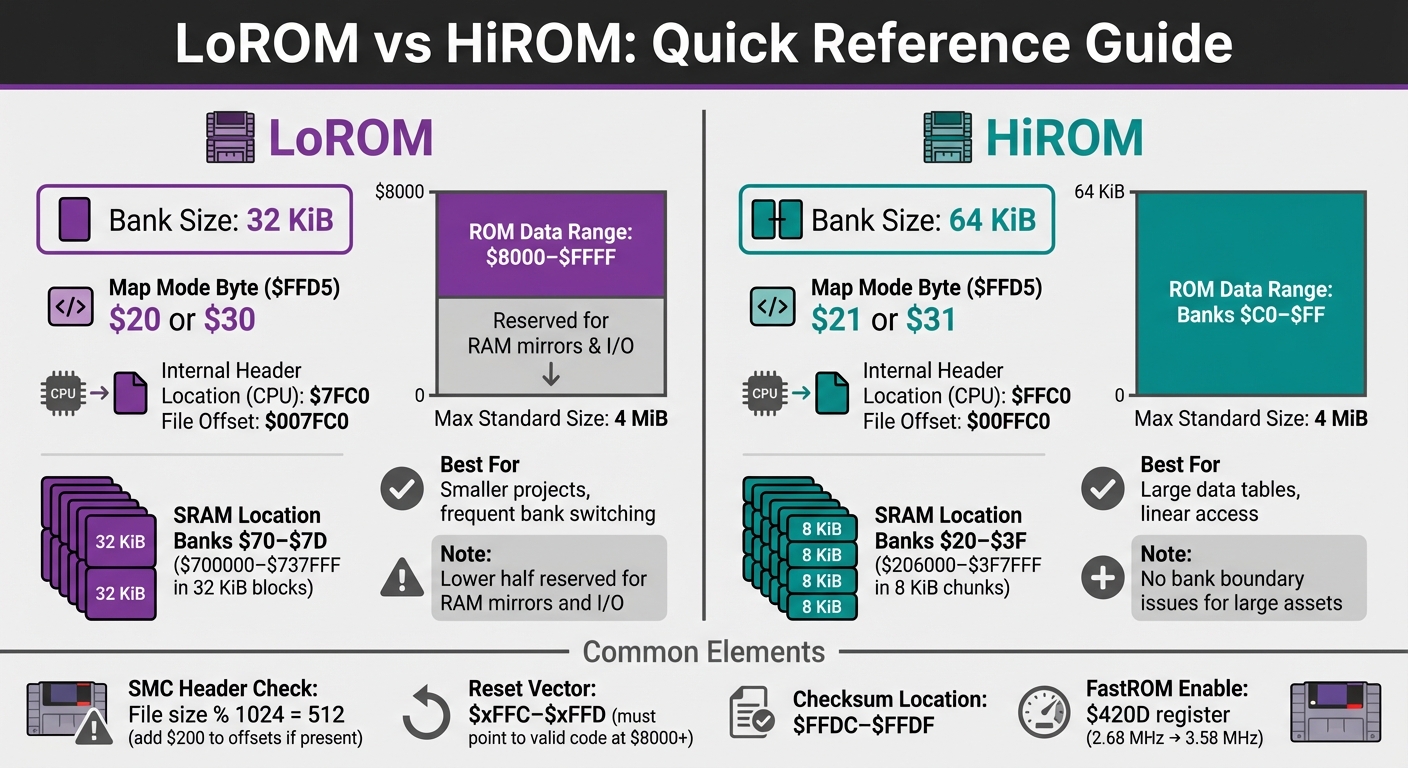
SNES LoROM vs HiROM Memory Mapping Comparison Chart
Once you're familiar with the basics, use this step-by-step guide to ensure your SNES memory configuration is properly set up.
Step 1: Identify LoROM or HiROM Format
Start by determining whether your ROM uses the LoROM or HiROM format. Check the Map Mode byte at address $FFD5 in the internal header. If the value is $20 or $30, it’s LoROM; if it’s $21 or $31, it’s HiROM. This tells the SNES CPU where to locate code and data.
Another way to confirm the format is by checking the physical header location in the ROM file. For LoROM, the header is at file offset $007FC0; for HiROM, it’s at $00FFC0. If the ROM includes a 512-byte SMC copier header, add $200 to these offsets. You can identify the presence of this header by verifying if the file size modulo 1,024 equals 512.
Finally, double-check your findings by verifying the checksum stored at $FFDC–$FFDF. The checksum and its complement should add up to $FFFF.
Step 2: Check the Cartridge Header
Next, review the internal SNES header located at CPU address $00FFC0–$00FFDF. Its physical location varies depending on the format: $007FC0 for LoROM, $00FFC0 for HiROM, and $40FFC0 for ExHiROM. Be sure to account for any offset adjustments identified in Step 1.
The header contains essential configuration details. For example:
- The Game Title at
$FFC0must be exactly 21 bytes long, padded with spaces ($20) if needed. - The ROM Size byte at
$FFD7and RAM Size byte at$FFD8indicate sizes as exponents (e.g.,$09means 512 KB). - The Cartridge Type at
$FFD6specifies if the ROM uses features like SRAM or battery backup (e.g.,$02for ROM+RAM+Battery).
Here’s a breakdown of key header fields:
| Address | Length | Field Name | Description |
|---|---|---|---|
| $FFC0 | 21 bytes | Game Title | Uppercase ASCII, padded with spaces |
| $FFD5 | 1 byte | Map Mode | Defines memory mapping and speed |
| $FFD6 | 1 byte | Cartridge Type | Indicates SRAM, battery, or co-processors |
| $FFD7 | 1 byte | ROM Size | Specifies size as 2^N Kilobytes |
| $FFD8 | 1 byte | RAM Size | Specifies size as 2^N Kilobytes of SRAM |
| $FFDC | 2 bytes | Checksum Complement | Bit-inverse of the checksum |
| $FFDE | 2 bytes | Checksum | 16-bit sum of all ROM bytes |
Step 3: Verify ROM Size and Bank Configuration
Make sure the ROM Size byte at $FFD7 matches your ROM’s size. If your ROM isn’t a power-of-2 size (e.g., 3 MB), mirror the data until the total size reaches the next power of 2 before calculating the checksum.
Understanding bank organization is crucial to avoid errors. In LoROM, ROM data occupies the upper half of each bank ($8000–$FFFF), while the lower half is reserved for RAM mirrors and I/O registers. In HiROM, banks $C0–$FF provide a full 64 KiB of linear ROM data, which is useful for managing large data tables without crossing bank boundaries.
Step 4: Organize Memory Addresses
Plan your memory layout carefully to avoid reserved system areas. For example, don’t assign custom data to the following:
-
$2100–$21FF(PPU registers) -
$4000–$40FF(joypad input) -
$4200–$44FF(DMA and CPU registers)
Use WRAM at $7E0000–$7E1FFF for frequently accessed variables. For LoROM projects larger than 2 MB, place executable code near the beginning of the ROM and large data assets toward the end. This ensures easy access to RAM and I/O mirrors.
Step 5: Configure SRAM for Save Games
If your ROM hack requires saving progress, set the RAM Size byte at $FFD8 and adjust the Cartridge Type at $FFD6 to enable battery-backed SRAM.
- In LoROM, SRAM usually maps to
$700000–$737FFFin 32 KiB blocks. - In HiROM, SRAM is typically mapped to
$206000–$3F7FFFin 8 KiB chunks.
Ensure SRAM doesn’t overlap with ROM data to avoid corrupting save files. Proper configuration is key to a smooth and reliable save system.
Advanced ROM Hacking Techniques
Setting Up Interrupt Vectors
Interrupt vectors are located at the end of the first ROM bank and direct the SNES CPU to specific routines when particular events occur. For LoROM, these vectors are found at CPU addresses $00FE40–$00FFFF (ROM offset $7E40–$7FFF). In HiROM, they remain at the same CPU addresses but shift to ROM offset $FE40–$FFFF. These vectors use a 16-bit little-endian format, meaning the least significant byte comes first.
Pay special attention to the Reset vector at $xFFC–$xFFD. This must point to valid ROM code starting at address $8000 or higher. The code at this location should begin with the instructions SEI, CLC, and XCE to transition from 8-bit Emulation mode to 16-bit Native mode.
The NMI vector, located at $xFEA–$xFEB, is triggered during vertical blanking (VBlank). This is crucial for safely updating graphics memory without causing screen tearing. If your ROM includes a 512-byte SMC header, add $200 to all physical offsets when modifying vectors in a hex editor to account for the header.
Working with I/O Registers
SNES hardware registers are mapped to specific memory ranges. For example, $2100–$21FF is used for PPU, APU, and WRAM functions, while $4000–$437F handles CPU operations, DMA, and joypad input. Before accessing these registers, use SEP or REP instructions to configure the accumulator and index registers to the appropriate mode.
During initialization, configure the $420D (MEMSEL) register to enable FastROM mode. This increases ROM access speed from 2.68 MHz to 3.58 MHz for banks $80–$FF. Set up $4200 (NMITIMEN) to manage interrupts and enable automatic joypad reading, with results stored in $4218–$421F. For performing multiplication, use $4202–$4203, and for division, utilize $4204–$4206. Always clear the VBlank flag by reading $4210 (RDNMI). Failing to do so can result in multiple NMIs during a single VBlank period.
Managing SMC Headers
For detailed instructions on handling SMC headers, refer to the earlier section. Modern emulators and flashcarts typically don’t require these headers. As noted by the SNESdev Wiki, "Modern common practice prefers unheadered ROM files." However, before applying any patch, confirm whether it’s tailored for a headered or headerless ROM. As Wikibooks warns, "A patch which is applied to the wrong type of ROM can easily kill the program code of the cartridge." If a header is present, remember to add 512 bytes to the offsets when making adjustments. If the header is missing, verify and proceed accordingly.
sbb-itb-9a4764e
Testing and Troubleshooting
Once your SNES memory map is set up, the next step is to test its functionality and resolve any issues. Here's how you can approach this process.
Debugging Tools for SNES ROMs
When it comes to debugging SNES ROMs, Mesen-S is a powerful tool to have in your arsenal. It offers a detailed debugging suite, including a Memory Viewer that provides read/write access to all ROM and RAM regions. It also features a Debug Log that flags uninitialized memory reads, which can lead to hardware instability. To make things even easier, the tool highlights recently accessed addresses with different colors, giving you a clear view of memory activity.
On the other hand, bsnes takes a slightly different route with its Manifest Viewer. This feature shows the exact memory map the emulator is using. If your ROM hack crashes or behaves unpredictably, you can create a .bml manifest file to manually define critical parameters like ROM size, RAM size, and board type, bypassing automatic detection. Both Mesen-S and bsnes also include trace loggers, which allow you to monitor CPU execution and identify where the code might be jumping to an incorrect memory bank.
One crucial tip: if your ROM has a 512-byte SMC header, it shifts all data by $200 bytes, disrupting the memory map. Modern standards recommend using headerless ROMs, so make sure to remove this header before continuing.
Testing on Physical SNES Hardware
Testing on actual SNES hardware offers a different set of challenges. Unlike emulators, which can sometimes guess the memory map, physical hardware relies entirely on the cartridge's wiring and the internal ROM header. This means strict adherence to LoROM or HiROM mapping is non-negotiable.
The SNES starts up in Emulation Mode and reads the Reset vector at $xFFC-D to determine where to begin execution. The code at this address must initialize the system properly, starting with SEI (to disable interrupts) and switching to Native Mode using XCE. Below is a quick reference for LoROM and HiROM requirements:
| Feature | LoROM Requirement | HiROM Requirement |
|---|---|---|
| Internal Header Location | $007FC0 | $00FFC0 |
| Bank Size | 32 KiB | 64 KiB |
| Max Standard Size | 4 MiB | 4 MiB |
| SRAM Location | Banks $70–$7D | Banks $20–$3F |
Make sure your ROM size is a power of two or aligns with standard sizes like 2 MB or 4 MB. If your hack includes save game functionality, double-check that the SRAM size in the header matches the specifications of your flashcart. Additionally, real hardware enforces timing differences between FastROM (3.58 MHz) and SlowROM (2.68 MHz), so ensure your setup accounts for these requirements - emulators might not.
If you encounter issues during hardware testing, the troubleshooting steps below can help you pinpoint and resolve them.
Fixing Common Memory Map Errors
Addressing memory map errors starts with reviewing the header and bank configurations. Begin by checking the ROM file size. If the size modulo 1,024 equals 512, an SMC header is present. Removing this header ensures the banks align correctly at $8000. Incorrect patching can also lead to corrupted cartridge code.
A frequent problem is header misplacement. The internal ROM header must be located at $00FFC0. For LoROM, this corresponds to a file offset of $7FC0, while for HiROM, it should be $FFC0. If the Reset vector is $0000 or blank, set byte $FFD5 to 0 for LoROM or 1 for HiROM.
Using Mesen-S's Memory Viewer with Access Highlighting can help verify that the CPU is executing code from the correct ROM banks instead of mistakenly accessing WRAM or hardware registers. Proper startup code often begins with instructions like SEI ($78), CLC ($18), or XCE ($FB). If you see BRK ($00) or SBC ($FF), the mapping is likely incorrect.
In LoROM, errors can occur when spanning a 32 KB boundary because address line A15 is ignored. When the CPU tries to read from an unmapped address, it might pick up the last value on the data bus - a glitch known as "Open Bus" - which often causes crashes. Before finalizing your ROM, recalculate the 16-bit checksum and its complement at $FFDC-$FFDF to ensure emulators can verify the mapping mode.
Conclusion and Resources
Key Takeaways
Here’s a quick recap of the essentials after diving into the SNES memory map and its intricacies. If you’re into ROM hacking, understanding the SNES memory map is a must. LoROM organizes data into 32 KiB banks (with the header at $007FC0), while HiROM uses 64 KiB banks (header at $00FFC0). To check for a 512-byte SMC header, simply calculate the ROM file size modulo 1,024 - if the remainder is 512, you’ll need to remove the header to avoid alignment issues. The internal ROM header, located at CPU address $00FFC0–$00FFDF, holds crucial info like the map mode byte at $FFD5 ($20 for LoROM and $21 for HiROM). Don’t forget to verify the interrupt vectors at $FFE0–$FFFF, especially the Reset vector at $xFFC–D, to ensure the CPU starts correctly. Lastly, recalculating the checksum and complement at $FFDC–$FFDF is key for confirming the ROM’s integrity.
Tools and Guides for ROM Hackers
If you’re looking to deepen your knowledge, these tools and guides are invaluable for mastering SNES memory mapping:
- Anomie's SNES Memory Mapping Doc, the SNESdev Wiki, and Wikibooks' "Super NES Programming": These cover all the technical details on LoROM, HiROM, and ExHiROM mapping modes, as well as header parsing and interrupt vectors.
- bsnes Manifest Viewer: Ideal for verifying memory maps, especially for prototypes or homebrew projects without standard headers.
- SNES Preservation Project Database: A reliable source for manifest data on commercially released games.
-
"Assembly for the SNES" (Gitbook): A great resource for understanding how to interact with the SNES’s 128 KiB of RAM at addresses
$7E0000–$7FFFFF.
Once you’ve got your technical groundwork in place, you’re ready to turn your ROM hack into something tangible.
About BJ's Game Vault

BJ’s Game Vault specializes in bringing your digital ROM hacks to life as custom cartridges for classic consoles like the SNES, NES, Sega Genesis, N64, and GBA. They ensure your custom cartridge is fully compatible with your project’s memory mapping needs. Prices for custom ROM hack cartridges generally range from $35 to $50, with free shipping available. Beyond custom cartridges, they offer a variety of retro gaming goodies, including reproduction vintage games, accessories, plush collectibles, and fan-made creations. Whether you’re hacking or collecting, BJ’s Game Vault is a one-stop shop for retro gaming enthusiasts. Check out their catalog and services at https://bjsgamevault.com to take your project to the next level.
FAQs
How do I know if my SNES ROM is LoROM or HiROM?
To figure out if your SNES ROM uses LoROM or HiROM mapping, you'll need to check the internal header's location. If the header is found at $007FC0 (file offset 0x7FC0), the ROM is LoROM. If it's at $00FFC0 (file offset 0xFFC0), then it's HiROM.
A hex editor or a ROM analysis tool can help you quickly pinpoint and confirm the header's position. This step is crucial to ensure you're using the correct memory map for your project.
What happens if SRAM is set up incorrectly in an SNES ROM hack?
Incorrect SRAM configuration in an SNES ROM hack can lead to major headaches, like save data not working correctly or games crashing out of nowhere. Since SRAM handles saving progress and other in-game data, any mistakes in its setup can corrupt save files or even stop the game from running as it should.
To steer clear of these issues, it's crucial to stick closely to the SNES memory map guidelines when creating ROM hacks. Always double-check your settings to ensure they align with the hardware and the game's requirements.
Why should ROM hacks be tested on an actual SNES console?
Testing your ROM hack on a real SNES console is key to making sure it works perfectly with the actual hardware. This includes things like the console's memory map, timing, and any extra cartridge hardware. While emulators are helpful tools, they can sometimes miss the finer details of how the original hardware behaves, which could lead to unexpected issues.
Using authentic hardware for testing helps you spot these compatibility problems early, ensuring your game performs just as you intended for players who use original SNES consoles.