


Common Bugs in ROM Hacks and Fixes
ROM hacks can breathe new life into classic games, but they often come with bugs that disrupt gameplay. These issues range from crashes to visual glitches and save errors. Here’s what you need to know:
- Why Bugs Happen: Bugs often stem from code errors, mismatched base ROMs, or emulator limitations. For example, a patch designed for one ROM version may corrupt another, or a hack might work in an emulator but fail on real hardware.
-
Common Bug Types:
- Crashes and freezes caused by uninitialized RAM or checksum errors.
- Graphics glitches like flickering sprites or distorted visuals.
- Save issues due to improper RAM initialization or mismatched save types.
- How to Fix Them: Use debugging tools like FCEUX or Mesen, test across multiple emulators and hardware, and always verify your base ROM files.
Testing on real hardware is critical since emulators may mask certain bugs. By using tools like hex and script editors and accurate emulators, you can troubleshoot and refine your hack for better stability.
Why Bugs Happen in ROM Hacks
Code Changes and Errors
Assembly hacking gives you immense control but demands precision. When you dive into a game's assembly code, you’re working directly with the instructions the CPU processes. These instructions differ between games and systems, making this type of hacking both powerful and risky. As Wikipedia puts it:
"Anything is possible with assembly hacking, usually within the limitations of the hardware and software of the gaming platform".
That flexibility, however, comes with the chance of breaking things.
Even small code changes can cause big problems. For instance, altering memory addresses can disrupt tools like cheat codes, which rely on fixed locations, or create conflicts in the game’s logic that lead to crashes. Imagine applying a "More Fireballs" patch to Super Mario World. While it might seem harmless, this change can interfere with Mode 7 bosses or overwhelm the system with too many objects, causing the game to crash.
For beginners, assembly's complexity often leads to oversights. They might miss glitches in level design or interactions between objects. Even seasoned hackers aren’t immune to trouble when transferring features between games. For example, porting Sonic 2’s "Multidraw" feature into Sonic 1 requires careful adjustments to the game engine, which aren’t always straightforward. These challenges at the code level often lead to a cascade of other issues, like mismatched base ROMs.
Wrong Base ROM Versions
Patches are essentially instruction sets: "replace this byte with that byte." But if the base ROM doesn’t match the patch’s expected version, those instructions end up altering the wrong parts of the file. The result? Corruption or crashes, sometimes as soon as the game loads. For example, applying a patch made for version 1.0 of a game to version 1.1 can lead to catastrophic crashes during gameplay or battles.
Headers can also throw everything off. SNES ROMs, for instance, might include a 512-byte header. If you apply a patch designed for a headered ROM to a headerless one, all modifications shift by 512 bytes, corrupting the file. Similarly, Genesis ROMs need to be in the .BIN format, not .SMD, and N64 ROMs come in three byte-order formats (z64, v64, n64), each producing different checksums. While mismatched ROM versions are a common source of bugs, emulators can introduce their own complications.
Emulator Compatibility Problems
Most emulators prioritize ease of use over perfect accuracy. Their goal is to run commercial games smoothly, even if that means cutting corners. These shortcuts can mask bugs in ROM hacks. Older emulators worked on a "whack-a-mole" basis - fixing one game often broke another, and they rarely matched the behavior of actual hardware.
What runs fine in an emulator might crash on real hardware. Emulators often skip invalid opcodes or timing quirks that would cause crashes on a console. For example, there are 11 specific invalid opcodes (like 0xD3 and 0xDB) that freeze real Game Boy hardware, but emulators like the 3DS Virtual Console simply ignore them. Differences in VRAM access timing, Echo RAM handling, and how registers initialize can make a hack seem stable in an emulator but fail on actual hardware.
The SNES’s Picture Processing Unit (PPU) is another tricky area. It functions like a "black box", with internal latches that emulators can only approximate. Even slight timing errors - off by just a few cycles - can cause visual glitches like shaking status bars or broken raster effects. While modern emulators focused on accuracy have reduced game-related bugs by about 95%, achieving flawless timing remains a challenge.
sbb-itb-9a4764e
Pokemon Yellow Fort Knox Edition - My New Bugfix Romhack Speedrun in 2:20:42
Common Bug Types in ROM Hacks
ROM hacks, while exciting and creative, often come with their own set of bugs that can disrupt gameplay. Let’s dive into some of the most common issues players encounter.
Crashes and Freezes
One of the most frustrating problems is when a game refuses to boot, leaving you staring at a black screen or garbled graphics. This usually happens because the hack hasn’t properly initialized elements like RAM, registers, or mapper states during startup. On the Sega Genesis, for example, failing to update the internal checksum after modifying a ROM will cause the game to lock up immediately. Emulators like Gens can help by enabling "Auto Fix Checksum", or you can use a dedicated utility to resolve the issue.
Hard crashes, such as those caused by stack overflows or bank switching errors, result in the system halting entirely, often accompanied by distorted graphics during CPU-heavy moments. On the other hand, softlocks are a bit sneakier. The game doesn’t fully crash - music might still be playing - but you’re stuck, unable to move or progress. These often stem from issues like improper handling of controller inputs or missing event triggers.
Graphics and Audio Problems
Visual glitches in ROM hacks can range from minor annoyances to full-blown gameplay interruptions. You might see flickering scanlines, random "garbage" sprites, incorrect color rendering, or jerky scrolling that throws off the experience. In some cases, having too many sprites on screen - like during an intense boss fight - can overwhelm the game’s rendering system and cause visual errors.
Audio issues are another common headache. These can include persistent 60Hz buzzing, distorted or oddly high-pitched notes, muted sound channels, or even missing sound effects. On the NES, using DPCM samples creates a unique challenge: they can interfere with controller inputs and graphics rendering, leading to unintended commands or visual glitches that destabilize the game. These problems can also spill over into save functionality, creating even more complications.
Save and Progress Errors
Save system bugs can be particularly tricky. They often occur when RAM isn’t initialized correctly. While emulators typically set RAM to zero by default, real hardware introduces unpredictable data at startup, which can make save errors worse. For instance, a critical bug in a Super Mario Bros. 3 save patch (analyzed in January 2024) revealed that if a specific memory cell at $7955 wasn’t zero at startup, the game would enter an infinite loop on actual hardware. Similarly, in Silva Saga, initializing save RAM to all zeros results in three blank, non-functional save files, preventing proper gameplay.
Save type mismatches and naming conflicts add to the chaos. If your emulator is configured for SRAM but the hack expects EEPROM or FlashRAM, your saves might not work at all. Additionally, save files must match the ROM’s exact filename - case sensitivity can trip you up on some systems. For example, Game.nds won’t recognize Game_v1.srm.
Cheat codes can also wreak havoc. As Kimjun from Ace Trainer at PokemonCoders points out:
"Most cheat codes write or make changes directly to your save data... even if you turn the cheat off, the items have already been given and they will still remain".
To avoid losing progress, always back up clean save files before experimenting with cheats or memory-altering tools.
How to Fix Bugs in ROM Hacks
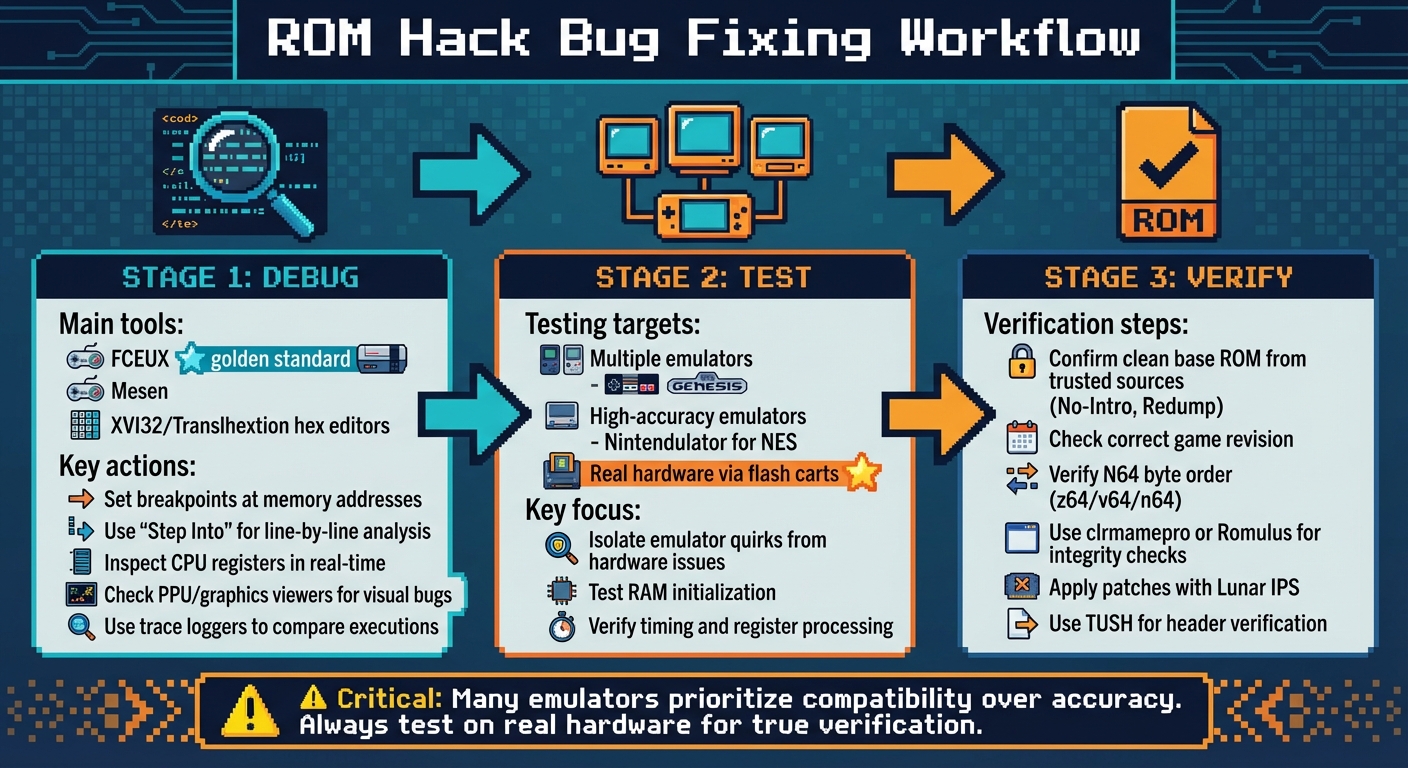
ROM Hack Bug Fixing Workflow: Debug, Test, and Verify
Debugging Tools and Methods
When it comes to fixing bugs in ROM hacks, emulator debuggers are your best friend. Tools like FCEUX and Mesen come packed with features that let you pause the game, inspect assembly code, and monitor CPU registers in real time. As the Emulation General Wiki puts it:
"FCEUX is the golden standard for emulator debuggers, it's a fully featured one and very newbie-friendly".
To pinpoint issues, use breakpoints to pause the game's execution at specific memory addresses. Advanced debuggers even allow conditional breakpoints, which activate only when a register hits a particular value. If the game crashes, tools like "Step Into" and "Step Over" come in handy. "Step Into" lets you run the code one instruction at a time, while "Step Over" skips subroutines to help you zero in on the problematic line.
Hex editors, such as XVI32 or Translhextion, are invaluable for directly editing ROM data. They allow you to tweak raw bytes, modify game values, or apply manual patches. For visual glitches, PPU and graphics viewers let you inspect tiles, palettes, and sprites loaded into video memory. Meanwhile, trace loggers record every CPU instruction, making it easier to compare a buggy execution trace with a working one and identify discrepancies.
These tools are essential for tackling common issues like crashes, graphical errors, and save-related bugs.
Testing on Different Emulators
Once you've used debugging tools, it’s time to test your ROM hack on multiple emulators. Why? Because emulators don’t all handle code the same way. Some focus on compatibility with existing games and might overlook bugs that would cause crashes on real hardware. A hack that runs perfectly on one emulator might fail spectacularly on another due to differences in RAM initialization, timing, or how registers are processed.
High-accuracy emulators like Nintendulator for NES or cycle-accurate SNES emulators are especially helpful for uncovering these subtle issues. And if you want to take it a step further, testing on original hardware using flash carts is the ultimate way to ensure compatibility. This approach can reveal hardware-specific conflicts that emulators might miss entirely.
By testing across multiple platforms, you can isolate emulator quirks from real hardware issues, making your ROM hack more reliable.
Checking Base ROM Files
A solid ROM hack starts with a clean base ROM. Always verify that your base ROM is unmodified and comes from trusted preservation groups like No-Intro (for cartridges) or Redump (for discs). Using an incorrect or altered ROM can lead to patch incompatibility and other headaches. Most hacks are designed for a specific game revision, so double-check that you’re working with the right version.
For Nintendo 64 hacks, pay special attention to byte order. ROMs for this system might come in formats like z64 (big endian), v64 (byteswapped), or n64 (little endian). The patch you’re applying will often require a specific format, so make sure they match. Tools like clrmamepro or Romulus can verify your ROM's integrity against official .dat files, ensuring you have a reliable foundation for your hack.
Conclusion
ROM hack bugs often stem from issues like initialization failures, PPU timing problems, or patching errors due to mismatched base ROM versions. Tackling these challenges requires a methodical approach: use reliable debugging tools, test across multiple emulators and real hardware, and always verify your base ROM files. Ensuring the stability of a hack hinges on thorough validation.
Interestingly, some bugs only appear when running on real hardware. As the NESdev Wiki explains:
"Many emulators are merely trying to be compatible with existing games, rather than accurately reflecting the hardware, making them inadequate for verifying the correctness of new software".
This highlights the importance of testing on actual hardware using flash carts or reproduction cartridges - an essential step for dedicated ROM hackers.
For those seeking a seamless retro gaming experience on original consoles, BJ's Game Vault offers a solution. They provide carefully tested ROM hack cartridges for systems like the NES, SNES, Sega Genesis, N64, and GBA. These cartridges are built to perform reliably on original hardware, with prices generally falling between $35 and $50. Additionally, they offer custom game creation services, allowing enthusiasts to turn their own hacks into physical cartridges.
Whether you're perfecting your own ROM hack or enjoying a professionally polished one, certain tools and practices are non-negotiable. Stick to trusted patching tools like Lunar IPS, use TUSH to verify ROM headers, and follow a checklist for playing ROM hacks to test extensively before sharing your work.
FAQs
How can I tell if my base ROM is the right version for a patch?
To ensure your base ROM is compatible with the patch, you'll need to confirm details like its region, revision, checksum, or other specific identifiers. Tools such as ROM hashers can help you verify these details. Alternatively, compare the ROM's information directly with the patch's listed requirements. Keep in mind that patches usually require an exact match to work properly.
Why does my hack work in an emulator but crash on real hardware?
When your hack runs smoothly in an emulator but crashes on actual hardware, it's likely due to the fact that emulators don't exactly mimic how a console operates. Emulators often prioritize running a wide range of games over replicating every hardware detail precisely. This can lead to problems like inaccurate hardware emulation, timing differences, or reliance on undefined behaviors that don't function the same way on real consoles. These subtle differences can make or break functionality when transitioning from emulator to hardware.
What’s the fastest way to debug a crash or softlock?
When dealing with a crash or softlock in a ROM hack, the fastest way to pinpoint the issue is by using a debugger tool. These tools allow you to examine game instructions, memory states, and the overall execution flow. Popular options like FCEUX or GDB with RetroArch come equipped with features such as breakpoints, step-by-step execution, and crash logs. These capabilities make it easier to locate the exact point of failure, streamlining the debugging process and saving you time.