


SNES Music Hacking: Advanced Techniques
SNES music hacking involves modifying or replacing audio in SNES ROMs, working with the SPC700 CPU and its 64KB RAM. Unlike other ROM hacking areas, it’s challenging because each game has a unique, undocumented sound engine. This guide covers tools, techniques, and real-world examples for creating custom music, restoring lost tracks, or even adding CD-quality audio using MSU1.
Key Takeaways:
- Tools: AddmusicK (Super Mario World), AddmusicY (Yoshi’s Island), Asar (ASM), Mesen (debugging), FLIPS (patching).
- Challenges: Limited 64KB ARAM for music, sound effects, and echo; unique sound engines per game.
- Advanced Techniques: Porting music, remapping instruments, ASM hacking for custom drivers, and integrating MSU1 for CD-quality audio.
- Community: SMW Central and Romhacking.net are hubs for resources and support.
Learn how to navigate hardware limits, troubleshoot common errors, and optimize your hacks for both emulators and real hardware.
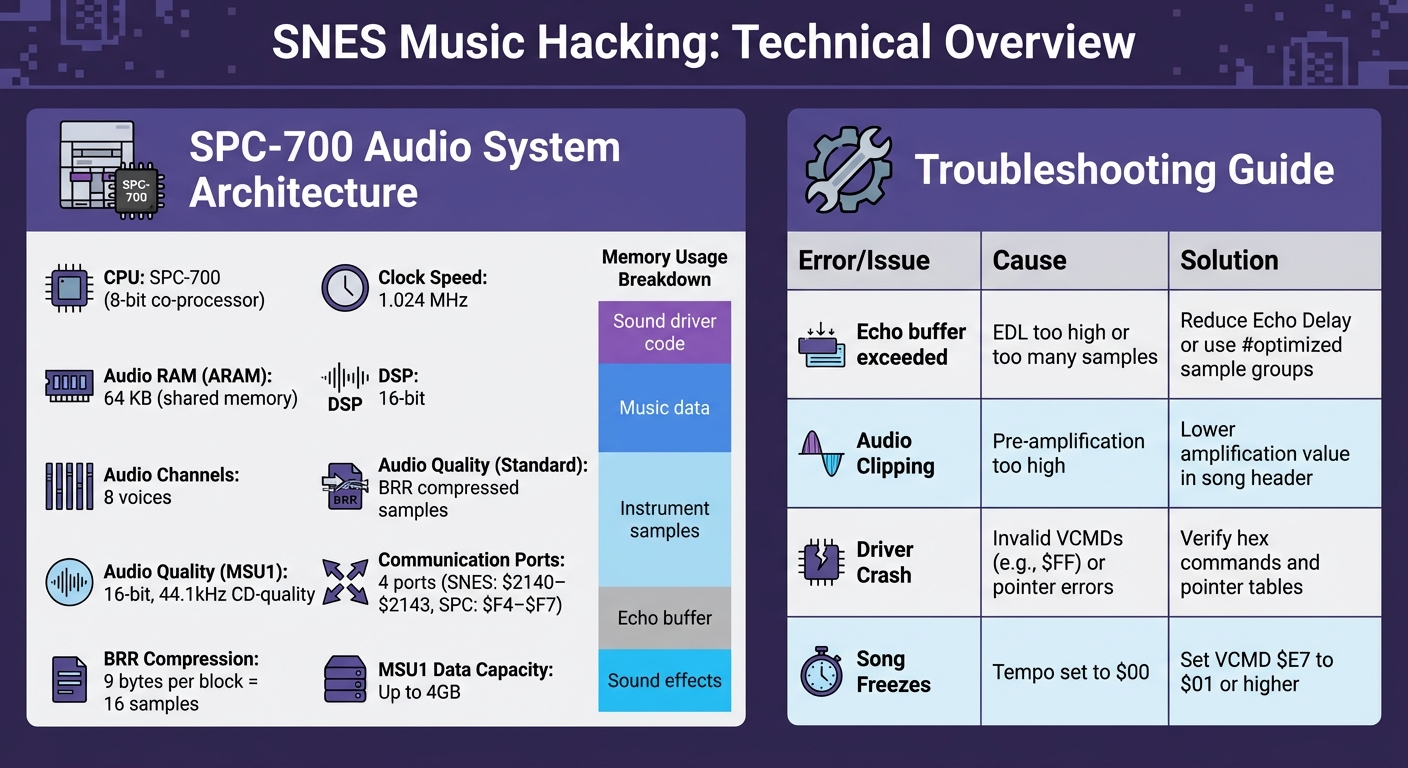
SNES Audio Hardware Specifications and Common Music Hacking Errors
Tools and Setup for SNES Music Hacking
Required Tools and Software
If you're diving into SNES music hacking, you'll need the right tools to get started. For Super Mario World projects, AddmusicK is the go-to tool. It allows you to insert custom MML (Music Macro Language) files and audio samples directly into the ROM. If you're working on Yoshi's Island instead, you'll need AddmusicY for similar functionality.
To make ASM modifications, Asar is the assembler you'll rely on. For debugging, Mesen is highly recommended. According to the SNESdev Wiki:
Mesen is recommended, as it's still under active development, has the most features, and is likely the most accurate at this point.
While bsnes-plus and the debugger version of Snes9x are still used, Mesen stands out for its real-time monitoring of sound registers and ARAM.
For creating music, tools like Furnace (a multi-system chiptune tracker) and Terrific Audio Driver (for MML composition) are essential. To apply or create binary patches in formats like .bps or .ips, you'll need patching tools such as FLIPS or Lunar IPS. Many of these tools are available on resource hubs like SMW Central and SnesLab.
Once you've gathered these tools, it's time to prepare your ROM for custom music modifications.
Preparing Your ROM for Hacking
Before jumping into music hacking, it's essential to understand your ROM's structure. Start by configuring it to support your modifications. For example, AddmusicK automatically detects SA-1 ROMs by checking the value at address $00FFD5. If it reads $23, the ROM is SA-1 compatible. For larger 4MB ROMs, AddmusicK saves data in banks $40+, leaving lower banks free for ASM code.
Whether your ROM is headered or headerless will impact how tools like Asar handle memory offsets. To protect your data, use RATS tags, which prevent other tools from overwriting specific regions of the ROM. AddmusicK uses free space detection to store unprotected data beyond the normal ROM boundaries.
Keep in mind that ARAM (audio RAM) is extremely limited. This memory is shared between the music program, sound effects, instrument samples, and echo data. The "Global" section in ARAM is reserved for songs that require immediate playback, as it permanently occupies this limited space.
SNES Sound Hardware Basics
The SNES audio system is powered by an SPC-700 CPU, an 8-bit co-processor running at 1.024 MHz. It has 64 KiB of ARAM and a 16-bit DSP capable of handling eight voices. This memory is shared by the sound driver, music data, samples, and the echo buffer.
These hardware limitations shape how you manage music data and samples during your hack. As Gau of the Veldt explains:
The SPC-700 is a co-processor. This means it is a separate CPU inside the SNES with its own memory and instruction set.
The main SNES CPU communicates with the SPC-700 through four 8-bit I/O ports: $2140–$2143 on the SNES side and $F4–$F7 on the SPC side. Samples are compressed using BRR (Bit Rate Reduction). Each 9-byte block encodes 16 raw 16-bit samples. For high-quality instruments, aim for recordings around 30 kHz before BRR conversion. This ensures a broad tonal range when the pitch is adjusted.
sbb-itb-9a4764e
Advanced SNES Music Hacking Techniques
Porting and Customizing Music
Porting music from other games to the SNES means reshaping compositions to fit within the console's hardware constraints. The challenge is to adapt tracks like those from Star Fox or Super Mario 64 to the SNES's sound system while keeping their original essence intact.
One technique involves sampleless ports, where you rely solely on the SNES's existing instrument library instead of importing external audio samples. For example, in February 2026, a user named "7 up" shared a port of the "Controls Menu" music from Star Fox on the SMW Central community. This port didn't use any external samples and included three different instrumental versions. One version even utilized the "@0" sound setting to closely match the audio profile of the SNES hardware.
Another key aspect of customization is remapping instruments. This involves assigning specific instrument IDs to replicate the sound of the source material. Since the SNES has only eight audio channels, you must carefully distribute instruments so that essential sound effects during gameplay don’t interfere with the music. Richard Price, CEO of Academia.edu, once described this process:
Every drum beat, every note in the melody had to be perfectly orchestrated to fit into these few available channels, like a perfectly assembled LEGO set.
A notable example comes from January 2019, when a user named "Samantha" successfully ported the "Merry-Go-Round" theme from Super Mario 64 for use in Super Mario World ROM hacks. Samantha's work included multiple versions - one that stayed faithful to the original and another optimized for SNES hardware - giving ROM hackers options to suit their projects.
These methods lay the groundwork for even more advanced modifications using custom music drivers.
Expanding Music Drivers with ASM Hacking
To push the boundaries of SNES audio, you can modify the game's music driver using assembly (ASM) code. The first step is to pinpoint hijack points, which are the moments when the game triggers music changes. Debugging tools like BSNES-plus or Higan can help you monitor writes to the SPC700 communication ports located at memory addresses $2140–$2143.
Once you find a trigger point, use a JSL (Jump to Subroutine Long) or JMP instruction to redirect the CPU to unused ROM space where your custom code resides. To avoid disrupting the game's functionality, fill any leftover bytes with NOP (No Operation) instructions. This ensures that the rest of the code remains aligned and prevents potential crashes.
Before making changes to data or audio registers, check for the "S-MSU1" identification string across registers $2002 to $2007. Also, verify the "Data busy" (bit 7) or "Audio busy" (bit 6) flags in the status port $2000 to avoid conflicts. If the MSU1 chip isn’t detected, your code should default back to the original SPC700 routine.
These ASM modifications pave the way for integrating MSU1, which unleashes the SNES’s full audio potential.
Adding CD-Quality Audio with MSU1
To break free from the SNES's traditional audio limits, you can implement MSU1 (Media Streaming Unit 1). Designed by byuu/Near, this virtual coprocessor allows the SNES to handle 16-bit, 44.1kHz CD-quality audio and access up to 4GB of data. MSU1 expert qwertymodo elaborates:
This 'chip' enables playback of CD quality lossless audio (16-bit, 44.1kHz), as well as addressing up to 4GB of data, far more than a typical SNES cartridge could ever hold.
To use MSU1, you'll need a patched ROM (.sfc), an MSU data file (.msu), and several PCM audio files (.pcm). These files must share the same base filename as the ROM (e.g., game.sfc, game.msu, game-1.pcm) for compatibility with emulators and flash carts like the FXPak Pro.
For patching, Floating IPS (FLIPS) is the go-to tool. It verifies ROM checksums to prevent errors during the patching process. Make sure your PCM files are normalized to avoid audio distortion. Since most MSU1 patches are built for headerless ROMs, often from the "No-Intro" set, double-check your ROM format before applying any patches. For emulation, use software like Snes9x v1.55 or newer, higan, or BSNES variants for full MSU1 support.
Case Studies: SNES Music Hacks in Action
The Legend of Zelda: A Link to the Past MSU1 Audio
The MSU1 upgrade for The Legend of Zelda: A Link to the Past showcases how hackers can swap out the original SPC audio for CD-quality tracks. This involves modifying the game's sound-loading routines by tracking writes to the SPC-700 registers at memory addresses $2140–$2143 and inserting a JSL into unused ROM space.
The custom ASM code checks for the MSU1 ID string ("S-MSU1") at memory address $2002. If it finds the string, it writes the track number to $2004, sets the volume at $2006, and enables looping playback via $2007. The MSU1 routes audio through the cartridge bus, where it mixes with the internal SNES sound before output. Byuu, the creator of MSU1, explained the simplicity of this process:
The cartridge bus has two pins for L and R audio that go straight out to your TV. It's basically like a microphone jack and mixes with the SNES' audio.
One of the biggest hurdles is balancing volume between the high-quality music and the original 8-bit sound effects, which can differ greatly between emulators and actual hardware. This issue is just one of several technical challenges. MSU1 PCM files, for instance, don’t include built-in loop points, requiring manual editing to ensure smooth looping or fade-outs. Additionally, the MSU1 lacks features like seeking or resuming, making transitions - such as switching from overworld to battle music - tricky without restarting the track. Despite these limitations, the final result requires a patched ROM, an MSU data file, and multiple .pcm audio files named specifically to match the ROM.
Cross-Game Mario Music Ports
Cross-game music ports highlight how flexible SNES sound engines can be. These ports adapt music data to work with the target game's sound driver, either by using internal sounds or integrating external samples.
A key challenge is keeping the original engine intact while adding new tracks. Some hacks use "SPC fallback", which ensures the original audio plays if PCM files are missing. For MSU1-based ports, the SPC700 chip continues to handle sound effects, while the MSU1 streams high-quality background music.
SNES Classic Menu Music Modifications
In March 2018, developers Swingflip and DanTheMan827 introduced the "Hakchi Advanced Music Hack v2.0.1" for the SNES Classic. This custom Hakchi module (hmod) replaces the default menu music with custom audio files. The hack uses USB-HOST mounting, allowing music to be stored on an external USB or SD drive instead of the system’s limited internal NAND memory.
One standout feature is randomized playback - each time the system boots, it selects a new track from the /media/hakchi/menu_music/ folder, creating a fresh experience every time. Thanks to USB-HOST mounting, users can load multiple 10MB WAV files without affecting system performance or storage. However, there’s a minor drawback: when a gameplay demo ends on the SNES Classic menu, the custom track restarts instead of resuming from where it left off. These examples highlight the ingenuity behind SNES music hacks and the creative solutions hackers continue to develop.
How to Setup MSU-1 Audio for FXPak Pro (SD2SNES) and Snes9x Emulation
Troubleshooting and Tips
Troubleshooting plays a key role in refining advanced music hacks and maintaining smooth SNES audio performance.
Common Errors and Fixes
With the limited ARAM available, exceeding its capacity can lead to errors like "Echo buffer exceeded total space in ARAM." To resolve this, you can either reduce the number of "Global" songs that remain in ARAM permanently or lower the echo delay (EDL) to shrink the buffer size.
Audio clipping is another frequent issue, often caused by overly high amplification settings that result in distortion. To fix this, lower the pre-amplification value in your song header or tool settings. If you notice pops or clicks when notes are triggered, insert a Note Cut command (e.g., SCx) one tick before the next note. For instance, if your song speed is set to 3, use SC2 to prevent overlapping trigger clicks.
| Error/Issue | Likely Cause | Recommended Fix |
|---|---|---|
| Echo buffer exceeded | EDL too high or too many samples | Reduce Echo Delay or use #optimized sample groups |
| Audio Clipping | Pre-amplification level too high | Lower the amplification value in the song header or tool |
| Driver Crash | Invalid VCMDs (e.g., $FF) or pointer errors | Verify hex commands and pointer tables in the ASM |
| Song Freezes | Tempo set to $00 | Ensure VCMD $E7 is set to a value of $01 or higher |
Once these common issues are addressed, debugging techniques can help identify and fix more subtle problems.
Debugging Techniques
Use the -v command line argument in AddmusicK to display detailed information about how much space each channel and sample occupies. This can help you pinpoint areas where memory is being wasted. Tools like SPC Tool allow real-time monitoring of DSP registers and out-ports. If a song freezes, check that VCMD $E7 (tempo) is not set to zero.
Sometimes, SPC RAM dumps may contain multiple songs or incomplete loading states, which can cause tools like VGMTrans to detect the wrong track. To fix this, let the song play longer in a player and save the dump again to refresh the RAM state. For register errors - such as the infamous typo in Hong Kong '97, where register ID $FE was mistakenly used instead of $6D - compare your code against standard N-SPC source builds to catch such mistakes.
Effective debugging lays the groundwork for improving performance and achieving better results.
Performance Optimization
To reduce memory usage and CPU load, use #optimized sample groups and enable bank optimization flags, such as -b for AddmusicK. This ensures only the necessary samples are loaded instead of the entire default library. The #pad command can also help by making sure a song is at least as large as the first song loaded, preventing the sample table from shifting into occupied memory.
When working with large ROMs (4MB or more), store music data in higher banks ($40+), leaving lower banks available for critical game ASM. If you’re using C700, export your work to the .smc (ROM) format rather than .spc. This shifts song data from ARAM to the main ROM, freeing up space for higher-quality samples. As noted in the AddmusicK documentation:
A rogue echo buffer can cause irreparable damage. Remember that moving the echo buffer has a delay associated with it of up to EDL * 16 ms
.
Conclusion and Next Steps
SNES music hacking revolves around mastering the SPC-700, a specialized Sony processor featuring a 64KB ARAM and 8-voice polyphony. As hardware researcher Gau Of The Veldt explains:
The SNES sound system was custom made by Sony specifically for the SNES. It's labeled as an SPC-700. It is superior to most sound chips of its time, for it has its own memory and instruction set, which takes the load off the main CPU
. This unique architecture makes advanced music hacking possible, but it also requires careful attention to its hardware limits.
Key Takeaways
To get started, download the SPC-700 documentation and experiment using your preferred DAW or MML tools. When composing manually, start with whole rests to create a silent baseline - this makes it easier to track changes as you work. Always test your hacks by exporting to the .smc (ROM) format from C700 rather than relying solely on .spc files. This approach shifts song data out of ARAM, freeing up room for higher-quality samples. By applying these practices, you can refine your skills and create polished, distributable hacks.
Resources for Further Learning
The SMW Central community is a great place to connect with other enthusiasts. With over 73,869 registered users and approximately 2,691 active members, it’s a hub for hacking discussions and guidance. For more technical support, check out Romhacking.net, where you can ask questions and receive feedback on your projects. By leveraging these communities and the advanced techniques discussed earlier, you’ll be well-equipped to produce hacks that not only sound great in emulators but are also ready for real hardware.
BJ's Game Vault as a Resource

For inspiration and benchmarks in hardware authenticity, consider exploring BJ's Game Vault (https://bjsgamevault.com). They offer rare ROM hack cartridges and custom cartridges, typically priced between $35 and $50. These cartridges demonstrate how hacks perform on actual hardware, providing valuable insights for your projects. Studying these physical implementations highlights the importance of maintaining hardware compatibility, especially when preparing your hack for physical distribution. Always ensure your work respects the SPC-700's constraints to achieve seamless performance on real SNES hardware.
FAQs
How do I know if my ROM is headered or SA-1?
To determine if your ROM is headered, the easiest way is to check its file size. A headered ROM usually includes an extra 512 bytes. For example, instead of being 2,097,152 bytes, it will measure 2,097,664 bytes.
If you're dealing with SA-1, you can also inspect the internal ROM header at specific memory locations. This requires using tools like hex editors. However, checking the file size remains the quickest and simplest method to identify a headered ROM.
What’s the best way to avoid running out of ARAM?
When modifying SNES music, running out of ARAM can be a common problem. To avoid this, consider shortening the song or removing unused samples. These steps help free up memory and prevent issues like silence or overflow caused by loading too much data.
When should I use MSU1 instead of SPC music?
When you need CD-quality audio (16-bit, 44.1kHz) or up to 4GB of data for features like seamless high-quality music loops, full-motion videos, or streaming data that surpasses the original ROM's limits, MSU1 is the go-to choice. It's perfect for projects that demand improved audio and multimedia performance.