

Multiplayer ROM Hacks: Common Issues and Fixes
Multiplayer ROM hacks can turn classic games into cooperative or competitive experiences, but they often come with technical challenges. From compatibility issues to lag and desync errors, these problems can disrupt gameplay on both emulators and original hardware. Here’s what you need to know:
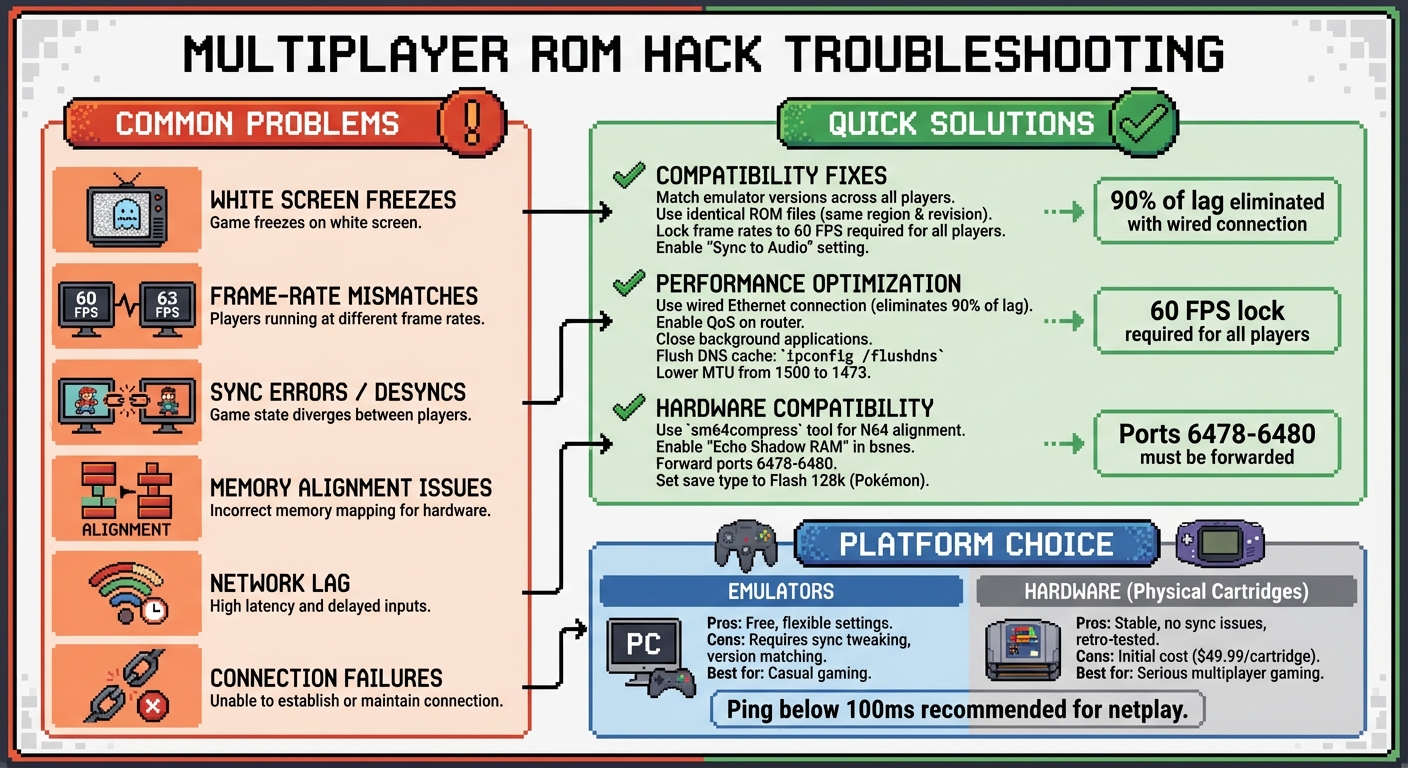
- Common Problems: White screen freezes, frame-rate mismatches, sync errors, and memory alignment issues.
-
Solutions: Match emulator versions and ROM files, lock frame rates, optimize network settings, and use tools like
sm64compressfor hardware compatibility. - Hardware vs. Emulators: Physical cartridges, like those from BJ's Game Vault, can bypass many emulator-related issues and provide stable multiplayer on original consoles.
- Performance Tips: Use wired connections, enable QoS on routers, and adjust emulator sync settings to reduce lag and desyncs.
The takeaway: Whether you’re tweaking emulator settings or using retro-tested cartridges, addressing these issues ensures a smoother multiplayer experience for classic games.
Multiplayer ROM Hack Troubleshooting Guide: Common Issues and Solutions
Compatibility Issues in Multiplayer ROM Hacks
Mismatched Emulator Versions and ROM Variants
When tackling compatibility issues in multiplayer ROM hacks, having identical emulator and ROM setups is non-negotiable. Even the smallest differences in emulator versions can lead to desynchronization - a situation where one player's game state veers off from the other’s, often within moments of starting.
For example, differences in frame rates - like 63 FPS versus 60 FPS - can throw off link cable timing, leading to communication errors at crucial moments. To prevent this, ensure all players lock their emulators to 60 FPS. If you're using GBA emulators like mGBA, enabling "Sync to Audio" during the intro can help align windows and standardize synchronization settings.
The choice of ROM variant is just as important. Many hacks come with multiple versions, such as "Dynamic" patches tailored for specific level editors or versions optimized for consoles that avoid emulator-specific shortcuts. Always verify the recommended base ROM, which is typically version 1.0, and ensure the file extension matches the intended platform (e.g., .SFC for SNES hacks running on bsnes).
While emulators offer some flexibility, real hardware introduces its own set of challenges.
Platform-Specific Problems
Unlike emulators, real hardware enforces stricter technical requirements, and memory alignment is a common stumbling block. For instance, the Nintendo 64 demands that ROM addresses adhere to 2-byte alignment, while RAM addresses must follow 8-byte alignment. Failing to meet these requirements often results in white screen freezes on actual consoles. Tools like sm64compress can automatically adjust level script commands to conform to these alignment rules.
Graphics plugins also add complexity, especially for N64 multiplayer hacks. Older hacks that rely on legacy plugins, like Jabo's or Rice, may experience missing textures or errors when run with modern, high-accuracy plugins. To avoid these issues, use ParaLLEl-N64 for console-compatible hacks and OGRE for older, legacy hacks.
For high-accuracy emulators like bsnes, specific settings are often required to ensure smooth gameplay. For example, enabling options like "No VRAM Blocking" and "Echo Shadow RAM" can help prevent sprite glitches or crashes. If you're working with an original v1.0 ROM, you may need to enable VRAM blocking instead.
Performance hacks, such as RCVI, can sometimes reduce lag in emulators but may introduce visual artifacts or even prevent a game from booting on actual N64 hardware. To maintain console compatibility, revert the ROM offset at 0xF00C2 to 02 0D.
sbb-itb-9a4764e
Lag and Performance Problems
Common Causes of Lag
Multiplayer ROM hacks often run into two major types of lag: network lag and input lag. Network lag usually stems from unstable internet connections, while input lag can result from display or hardware delays. Another culprit is bufferbloat, where non-essential data clogs up the pipeline, delaying critical gaming information and causing sudden spikes in lag. On the hardware side, thermal throttling can occur when your gaming setup or router overheats, forcing the system to slow down to cool off, which results in performance dips.
Background processes are another hidden source of trouble. Things like Windows Updates, cloud syncing (e.g., OneDrive), or even having too many browser tabs open can hog bandwidth. NAT type issues - especially if your settings are "Moderate" or "Strict" - can disrupt connections between players. If you're on CGNAT (Carrier-Grade NAT), which is common when your WAN IP starts with 100.x.x.x, you might experience lag spikes due to sharing a public IP with multiple users.
Knowing these causes is the first step to improving performance and reducing lag.
Performance Optimization Tips
Here are some practical ways to tackle lag and boost performance:
- Switch to a wired Ethernet connection or use a 5GHz Wi‑Fi band for more stable, faster connections. Wired setups alone can eliminate up to 90% of common lag issues.
- Enable Quality of Service (QoS) on your router to prioritize gaming traffic and disable energy-saving options like "Green Ethernet", which can disrupt network performance.
- Clear outdated network routes by flushing your DNS cache (
ipconfig /flushdns), and enable UPnP (Universal Plug and Play) to ensure an "Open" NAT type for smoother peer-to-peer connections.
If your router struggles with congested ISP routes, try lowering the Maximum Transmission Unit (MTU) from the default 1500 to 1473 or 1450. This can reduce packet fragmentation, making data transfer more efficient. Daniel Hidalgo, a gaming optimization expert, explains: "Smaller packets are sometimes 'sturdier' and more likely to make it through a congested ISP route without being dropped". He also advises that "A steady 10Mbps connection is better for gaming than a 'spiky' 1000Mbps connection".
Zelda Link to the Past Hack (Parallel Worlds) Multiplayer CO-OP #1
Out-of-Sync Errors in Multiplayer Sessions
Desynchronization occurs when players in a multiplayer session experience different game states. For example, one player might see their character moving normally on their own screen, while another player sees that same character behaving unpredictably. Other signs include "communication error" messages, sudden freezes, or mismatched screen progression. The Dolphin Emulator Wiki explains it this way:
The person I'm playing with seems to be moving around strangely but he says that I'm the one moving weirdly. What happened? This is a desync. Basically what both of you are seeing are two different games.
The primary cause of these issues often lies in inconsistent synchronization settings or FPS discrepancies. For instance, if one player uses "Sync to Audio" while another uses "Sync to Video", or if one instance runs at 60 FPS and another jumps to 63 FPS, communication errors and desyncs are almost inevitable. GitHub contributor ghost highlights this problem:
While one window tries to keep it up at 60FPS, the other goes above 63FPS during trading. And that's when the desync happens and I get link errors in game.
To maintain stable sync, it's crucial to ensure all players use identical emulator settings and game files.
Version Matching for Stable Multiplayer
For smooth multiplayer gameplay, every player must use the exact same ROM file. This means the same region and revision (e.g., v1.0 vs. v1.1), ideally sourced from the same location. Even small differences in ROM dumps can lead to desyncs because memory addresses and game logic might not align correctly. Similarly, emulator versions must match. Newer builds often include fixes for netplay, and some emulators even block connections between mismatched versions to prevent desyncs.
Other factors, like differences in graphics resolution, cheat codes, or controller configurations, can also trigger sync issues. Using features like "Strict Settings Sync" ensures uniformity across all clients. Additionally, mismatched memory card contents or SD card data can lead to desynchronization. To address this, enabling "Save Syncing" or choosing "Load Host's Save Data Only" ensures everyone starts from the same state.
Beyond aligning files and settings, there are practical steps to further minimize sync problems.
Additional Sync Issue Fixes
If you encounter a white screen during startup, a lead developer suggests:
White screen is a sync issue. Try switching the audio driver or changing sync settings.
A useful workaround involves disabling both "Sync to Audio" and "Sync to Video" during the game's intro loop, then re-enabling "Sync to Audio" once both windows are running. Additionally, using a common audio driver - like Qt or your operating system's default driver - across all instances can help resolve recurring white screen errors.
For ROM hacks, specific compatibility adjustments may be required. In bsnes, for example, you can go to Settings > Compatibility and enable "Echo Shadow RAM" and "No VRAM Blocking" to prevent crashes after completing levels. Ensure your ROM file uses the correct extension (e.g., .SFC for SNES). Also, verify that all players are using files with matching checksums. Finally, closing background programs like antivirus software, cloud sync services, or Windows Updates can help avoid timing interference and reduce unexpected desyncs.
Connection and Local Multiplayer Problems
Beyond emulator quirks and synchronization hiccups, connection and local multiplayer issues can seriously disrupt gameplay.
Local Multiplayer Failures
Running multiple emulator windows on one PC often leads to freezing or communication glitches. One common issue is emulator windows freezing or losing communication when switching between them. To avoid this, head to your emulator settings and uncheck the option labeled "Pause when inactive window". This ensures all emulator instances run smoothly without interruptions.
Save file conflicts are another headache. When launching multiple emulator windows, the same save file might load across instances, creating conflicts. A simple fix? Rename each player's save file with a unique extension, such as .sa1 or .sa2. For Pokémon ROMs, it’s crucial to manually set the save type to Flash 128k in the emulator settings before accessing the trade center, preventing potential errors.
Some games, like Zelda: Four Swords, require specific timeout settings for proper linking. Adjust the timeout to values above 10,000 or below 200, depending on the game’s needs. Older titles, such as Pokémon Red, Blue, or Yellow, may struggle with standard GBA emulators. In these cases, switching to TGB Dual can improve compatibility and resolve link issues. These tweaks, combined with earlier sync and lag fixes, can help local multiplayer run more reliably.
Online Connection Issues
While local setups wrestle with file and window management, online play introduces its own challenges, particularly with network configurations. First, ensure your router is set up to allow emulator communication by forwarding ports 6478–6480 and adding the emulator to your Windows Firewall exceptions.
Geographic distance also plays a big role in latency. To minimize lag, choose a host location that’s geographically closest to all participants. During gameplay, fine-tune the input buffer settings: increasing the buffer reduces stuttering but adds slight input delay, while lowering it improves responsiveness at the risk of connection instability. Lastly, close any bandwidth-heavy applications - like web browsers, streaming platforms, or software like Skype - before starting your session. This builds on earlier tips for optimizing network performance.
BJ's Game Vault: Retro-Tested Hardware for Multiplayer ROM Hacks
When it comes to tackling multiplayer issues in ROM hacks, hardware solutions often provide a more reliable fix than software adjustments or network tweaks. Running ROM hacks on physical cartridges and original consoles can sidestep many of the problems that emulators face, such as sync errors, white screens, and communication failures.
Retro-Tested Custom Cartridges
BJ's Game Vault specializes in creating custom ROM hack cartridges designed to work seamlessly with original consoles like the NES, SNES, N64, Sega Genesis, and Game Boy. Each cartridge undergoes rigorous testing on retro hardware to ensure smooth gameplay, avoiding issues like FPS desynchronization, coordinate overflows, and graphical glitches.
"Each game is tested and built for real retro consoles because collectors deserve the classics that never were."
- BJ's Game Vault
With these cartridges, gamers don’t have to wrestle with complicated settings like "Sync to Audio" or "Sync to Video" to maintain stable multiplayer connections. Popular titles like Smash Remix v 2.0 and ECW House Party SK edition are available for $49.99 each, and they come with BJ's Collector's Guarantee. Plus, all orders include free shipping.
Subscription Boxes for Multiplayer Gaming
For those who want a steady stream of multiplayer-ready games, BJ's Game Vault offers subscription boxes tailored for retro gaming fans. There are two subscription tiers to choose from:
- The basic tier ($45/month) includes two ROM hack cartridges and a collectible.
- The premium tier ($85/month) delivers three cartridges and three collectibles.
Both tiers include bonus items like stickers and a discount card, making it easier to grow your multiplayer collection while enjoying exclusive extras.
Conclusion
Multiplayer ROM hacks breathe new life into classic games but aren't without their hurdles. Issues like sync errors and lag can disrupt the experience, but there are practical solutions. For instance, tweaking input buffers can help reduce netplay lag, especially when all players maintain a ping below 100 ms. Whether through software adjustments or hardware upgrades, these fixes lay the groundwork for smoother gameplay.
When it comes to reliability, hardware often has the upper hand over software fixes. Using physical cartridges can sidestep emulator-related issues, removing the need for constant sync adjustments. Retro-tested custom cartridges from BJ's Game Vault, for example, offer stable local multiplayer on original consoles.
Ultimately, players face a choice: refine emulator settings for casual gaming or invest in hardware solutions for a more dependable experience. While optimized netplay builds can suffice for some, BJ's Game Vault's custom cartridges offer a reliable option for serious gamers - and with free shipping, setting up multiplayer has never been easier.
FAQs
How do I verify everyone is using the exact same ROM and emulator setup?
To keep everyone on the same page, it's essential to use a verified, unaltered ROM file and ensure all players are running the exact same emulator version with matching settings. This includes input and network configurations. To double-check the ROM's integrity, verify its checksum or hash - this ensures the file is identical across all users. Matching emulator versions and settings is crucial for a seamless multiplayer experience.
What’s the fastest way to diagnose a desync vs. network lag?
To distinguish desync from network lag, pay attention to how the issue manifests. Desync typically results in mismatched game states - think characters teleporting or events happening out of sync. On the other hand, network lag shows up as delayed inputs or sluggish responses.
Lag spikes are usually sudden and unpredictable, while desync tends to stick around, even if your connection seems stable. By testing for consistency and ensuring your connection is solid, you can quickly figure out which problem you're dealing with.
When should I use a real cartridge instead of an emulator for multiplayer ROM hacks?
When emulator settings fall short - whether it's due to compatibility hiccups, lag, synchronization problems, or even just the desire for a more genuine experience - using a real cartridge can be the way to go. This is particularly true when dealing with hardware-specific features or ensuring smooth multiplayer gameplay.