


Top 5 SPC700 Hacks for Custom Audio
The SPC700 sound chip, central to SNES audio, has inspired tools and techniques that extend its capabilities for creating custom music. Here are five standout methods to enhance your SNES audio projects:
- C700 VST: A plugin for DAWs like FL Studio and Ableton, offering SPC700 emulation with full control over ADSR, echo, and MIDI commands. Includes modes for authentic or extended polyphony.
-
SNESMOD: Converts
.ittracker files to SPC-compatible formats. Ideal for SNES game development, with options for pitch modulation and echo effects. - Custom BRR Sample Creation: Enables precise control over BRR compression for high-quality sampled instruments. Focuses on clean loops and optimal memory usage.
- AddMusicK: Designed for Super Mario World ROM hacks, this tool uses MML to insert custom music and sound effects, managing the limited 64KB audio RAM efficiently.
- Terrific Audio Driver: A modern SNES audio driver supporting advanced effects like vibrato and surround sound while managing multi-channel compositions effectively.
These tools cater to diverse workflows, from DAW integration to tracker-based approaches, and ensure compatibility with SNES hardware. Whether you're working on ROM hacks or original homebrew projects, they provide robust solutions for crafting high-quality audio.
Quick Comparison:
| Tool | Best For | Key Features | Output Formats |
|---|---|---|---|
| C700 VST | DAW-based composition | ADSR control, echo effects, 8-16 voices, accurate emulation |
.wav, .spc, .smc
|
| SNESMOD | Tracker-based composition |
.it to SPC conversion, pitch modulation, echo parameter tweaks |
.spc |
| Custom BRR | Sample creation | BRR compression, loop optimization, pre-emphasis for high frequencies | .brr |
| AddMusicK | Super Mario World ROM hacks | MML-based music insertion, custom sound effects, ARAM management |
.spc, ROM patches |
| Terrific Driver | Homebrew SNES projects | Multi-channel audio, advanced effects, real-time editing |
.spc, custom ROMs |
These tools open up new possibilities for SNES audio while respecting the hardware's limitations.
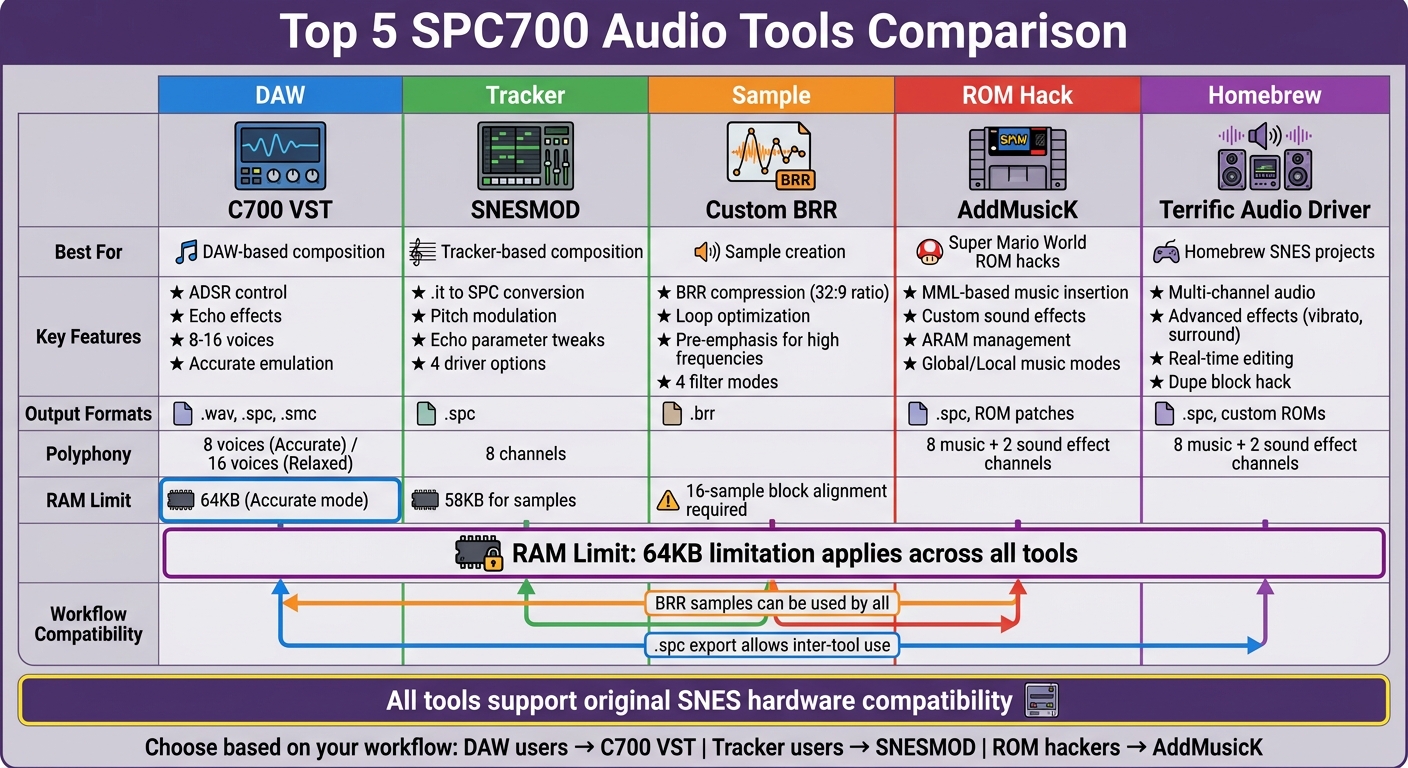
SPC700 Audio Tools Comparison: Features, Best Uses, and Output Formats
SNES/SFC Style Music - Episode 2b - Composing for C700 Complete How-To!
sbb-itb-9a4764e
1. C700 VST for DAW-Integrated SPC700 Emulation
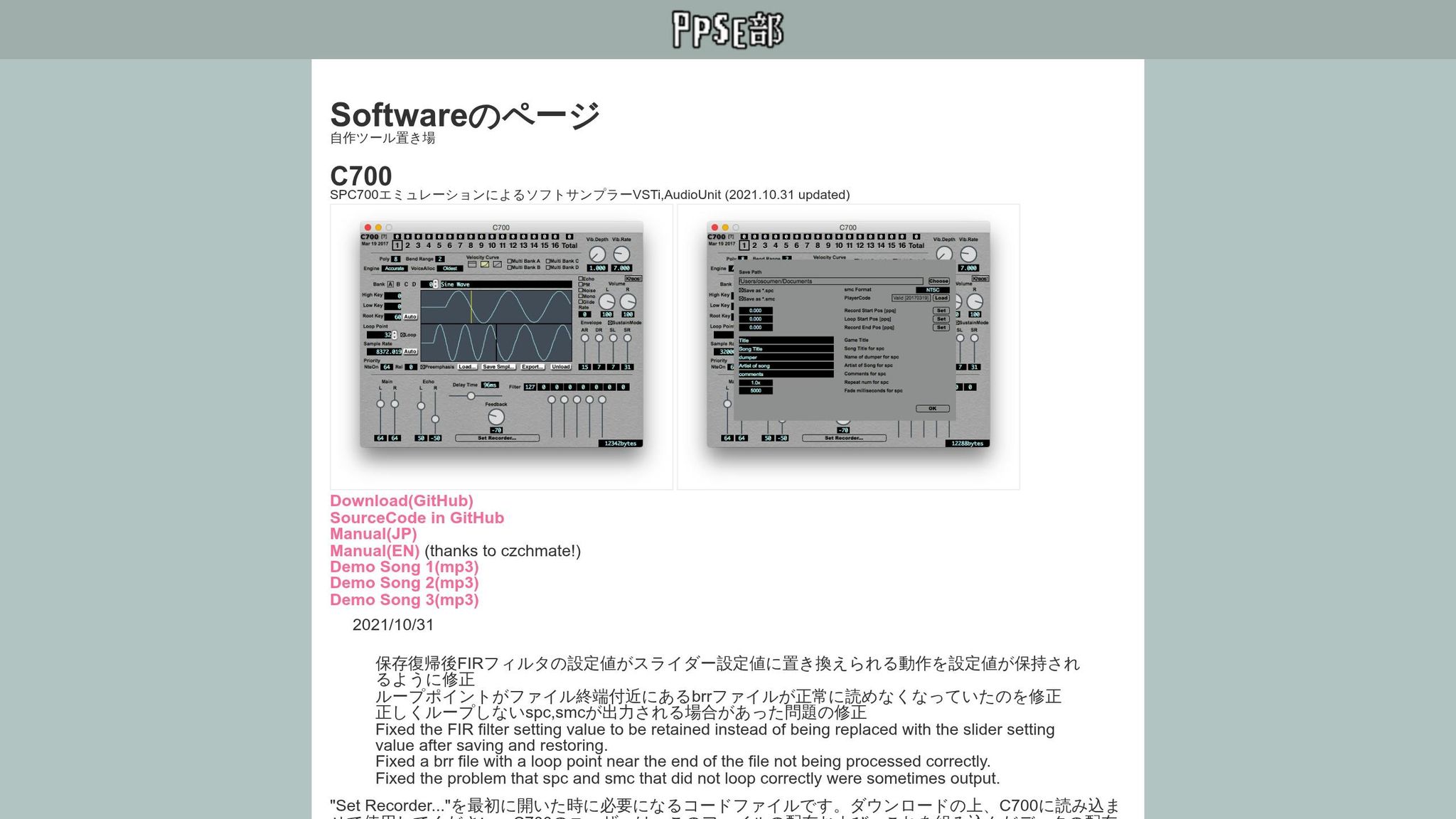
The C700 VST plugin brings the iconic SNES sound chip directly into your favorite digital audio workstations (DAWs). This free tool allows you to create music using the Sony SPC700 (S-SMP) chip - the same hardware behind classic SNES game soundtracks - all while working with familiar MIDI tools in DAWs like FL Studio, Ableton Live, or Cubase.
Audio Customization Capabilities
C700 supports importing various sample formats, including .wav, .aiff, .brr, and .spc, with room for up to 128 waveforms per project. You have complete control over your sound, from ADSR envelope editing to custom echo effects. It even provides direct access to SNES DSP registers through MIDI NRPN commands. For those looking to refine their sound further, the plugin includes a pre-emphasis filter, which compensates for the SNES's Gaussian filter to enhance high-frequency clarity.
"Using [Pre-Emphasis] compensates for the attenuation of high frequency content by the DSP at the time of playback, allowing the sample to be brought closer to the original waveform quality." - osoumen, Developer, C700 Documentation
The plugin operates in two modes: "Accurate", which mirrors the SNES's 8-voice polyphony and 64KB RAM limit for authentic results, and "Relaxed", which allows 16 voices and removes memory restrictions. A real-time RAM counter keeps you informed, notifying you if you exceed the 64KB limit in Accurate mode.
These features give you the tools to shape your sound while staying true to the SNES's original audio character.
Quality of Sound Output
C700 delivers a level of sound clarity that stands out, particularly when compared to tracker-based tools like SNESMOD. It minimizes glitches and ensures clean playback. For the best results, export your audio at 48,000Hz or higher - ideally 96,000Hz for precise pitch bends and reduced feedback buzzing.
Additionally, with the optional playercode.bin add-on, the plugin can export your work as hardware-compatible .spc (chiptune) or .smc (ROM) files, making it a versatile choice for both modern production and retro gaming projects.
"C700 should be your go-to method unless you are a die-hard .it tracker person or creating music for use in an actual SNES game." - HVB, Author of the SNES Chiptune Guide
2. SNESMOD IT-to-SPC Conversion Tool
SNESMOD builds on the SPC700's legacy by offering a tracker-based method for creating custom audio. It allows you to compose music in tracker software like OpenMPT or Schism Tracker using the .it format, then converts your samples into the SNES-compatible BRR format. This streamlined process makes it easier to create tailored audio while integrating seamlessly with SNES development tools.
Audio Customization Capabilities
SNESMOD provides four driver options, each tailored for different needs:
- Lite: Basic conversion for straightforward projects.
- Pitchmod: Adds pitch modulation and noise effects.
- SuperNoFX: Focuses on echo parameter control without sound effects.
- Celes: Allows mid-song ADSR adjustments and simulated filter sweeps.
Customization is taken a step further by letting you tweak echo parameters - like delay, feedback, volume, and FIR filter settings - through specific commands placed in your module's comments. The tool supports eight channels, aligning with the SPC700's 8-voice limit, and allocates up to 58KB of data for samples after BRR conversion. For the best results, use mono WAV files at 16,000Hz and tune samples to B+21 cents to ensure smooth looping within BRR's 16-sample block restriction.
Ease of Integration with SNES Development Tools
Converting files with SNESMOD is simple: just drag your .it file onto smconv.exe. Alternatively, you can use batch files or command-line options. SNESMOD works well with SNES development libraries like PVSNESLIB and assemblers such as TASM and ca65.
"The easiest way to proceed is to move or copy your .it file into the same folder as the .bat, type its filename into the prompt window... then hit Enter. Bam, your shiny new .spc will be created!" - HVB, Author of SNES Chiptune Guide
However, what you hear in OpenMPT won't exactly match the SNES output. Effects like echo delay and ADSR envelopes behave differently on real hardware, so frequent testing and conversion during composition are essential.
Quality of Sound Output
While SNESMOD is straightforward to use, achieving optimal sound quality requires careful attention to the quirks of SNES hardware. SNESMOD is more efficient with data than C700, but it can produce "pop" and "click" sounds when a new note overlaps one still playing.
"SNESMOD's glaring 'pop noise' issue... most frequently occurs when new notes trigger in a channel where a previous note was playing." - HVB, Author of SNES Chiptune Guide
To avoid these issues, insert the SCx (Note Cut) command one tick before triggering a new note. Additionally, applying pre-emphasis to samples can help counteract the SNES's Gaussian filter. While SNESMOD may not deliver the polished sound of C700, its efficient use of space makes it a go-to option for SNES game development.
3. Custom BRR Sample Creation Workflow
The custom BRR workflow builds on earlier tools to offer precise control over SPC700 audio. With custom BRR samples, you can shape your SNES audio exactly as needed. Bit Rate Reduction (BRR) is the SPC700's native compression format, shrinking 32 bytes of 16-bit PCM audio into just 9 bytes. This aggressive compression helps maximize the SPC700's limited 64KB RAM but requires careful handling to avoid audio artifacts.
Audio Customization Capabilities
BRR stores audio in 9-byte blocks, each containing a header byte and 16 nibbles. The header determines how the DSP decodes the data, offering four filter modes (0-3). Filter 0 skips prediction, making it ideal for the start of a sample. Filters 1-3, on the other hand, use prior samples for prediction, which smooths low frequencies but reduces high-frequency detail. Since the SPC700's Gaussian interpolation naturally softens high frequencies, many workflows include pre-emphasis - boosting treble before encoding - to counteract this effect.
"BRR, or Bit Rate Reduction, is the sound encoding scheme used by the SPC700... It has a compression ratio of 32:9." - Butcha, Super Famicom Development Wiki
Seamless Integration with SNES Development Tools
To ensure smooth integration, all samples and loop points must align with 16-sample boundaries. When editing, use hexadecimal values for sample lengths - if the last digit is 0 in hex, the length will be divisible by 16. Tools like Super-BRR-Converter's "BRR SAMPLE SELECT" make this easier by snapping selections to block boundaries. For perfect loops, resample audio to a frequency that's a multiple of 16 times the note's base frequency. For instance, an A note should be resampled to 14,080Hz, while a C note would require 16,744Hz. These precise adjustments are essential for creating high-quality samples.
Producing High-Quality Sound
Creating clean BRR samples requires attention to detail. Always start with a Filter 0 block and include at least three 0-amplitude samples at the beginning to ensure the Gaussian interpolator starts cleanly without leftover noise. Avoid extreme waveform peaks, as a hardware bug can cause a loud pop if three consecutive maximum-negative values occur. Shorter samples save space and create a lofi aesthetic. Even for non-looped samples, set a valid loop address pointing to a silent block to prevent the DSP from accessing random memory during the release envelope.
4. AddMusicK and AddMusicKFF for ROM Music Insertion
AddMusicK (AMK) and its fork AddMusicKFF are tools designed to integrate custom audio into Super Mario World ROM hacks. These tools allow you to replace the original soundtrack with custom compositions using Macro Music Language (MML), a text-based format that's much easier to manage than working with raw hexadecimal data. While these tools are tailored for Super Mario World, they’ve become the go-to choice for audio customization within the game's hacking community.
Audio Customization Capabilities
AMK offers detailed control over the SPC700's 64KB of audio RAM, giving you the ability to define "Global" music, which stays loaded in ARAM for quick playback, or "Local" music, which loads only when needed to save memory. This flexibility is crucial since the music program, samples, sound effects, and echo buffer all compete for limited space. The tool supports custom BRR samples, either individually or as part of sample banks (.bnk), and includes an "optimized" sample group that loads only the necessary elements for sound effects and global music.
"Space in ARAM (audio RAM) is very limited. It is shared between the music program, the music itself, the sound effects, the sound samples, and the echo data." - Kipernal, AddMusicK Creator
AMK also supports custom sound effects, which can be inserted on channels 6 (1DF9) and 7 (1DFC). For those with advanced skills, the tool allows embedding SPC-700 assembly code into sound effect files using #asm and #jsr commands. This opens up possibilities for creating effects like pitch slides and noise generation that go beyond standard MML capabilities. Other features inherited from AddMusicM include ADSR/GAIN settings, "super loops" for reducing file sizes, and dynamic echo control with custom FIR filters.
Ease of Integration with SNES Development Tools
Using AMK is straightforward. Place your music text files in the "music" folder and include headers like #am4 or #amm. Then, process them with AMKGUI. The tool generates a .msc file that Lunar Magic automatically reads, allowing your custom song names to appear in its music selection menus.
Behind the scenes, AMK uses the Asar assembler (asar.dll or asar.exe) to apply patches to your ROM. It even detects SA-1 ROMs by checking the address $00FFD5 and adjusts addressing as needed. For those who prefer automation, command-line options can simplify the workflow. For example, -norom generates SPC files without modifying the ROM, -p creates patches, and -visualize produces PNG files that map ARAM usage by color.
Compatibility with Existing SNES ROMs
AMK and AMKFF are specifically designed for Super Mario World ROMs, meaning they are not general-purpose SNES music tools. They function as the game's dedicated music engine, allowing for the replacement or addition of music within its framework. The tools also support older AddMusic 4.05 and AddMusicM ports by recognizing special headers in MML files. For tempo issues, you can prepend #option tempoimmunity to the MML file. If you encounter "Echo buffer exceeded total space in ARAM" errors, switching from #default to #optimized sample groups can free up memory by excluding unused standard SMW samples.
5. Terrific Audio Driver for Multi-Channel Composition
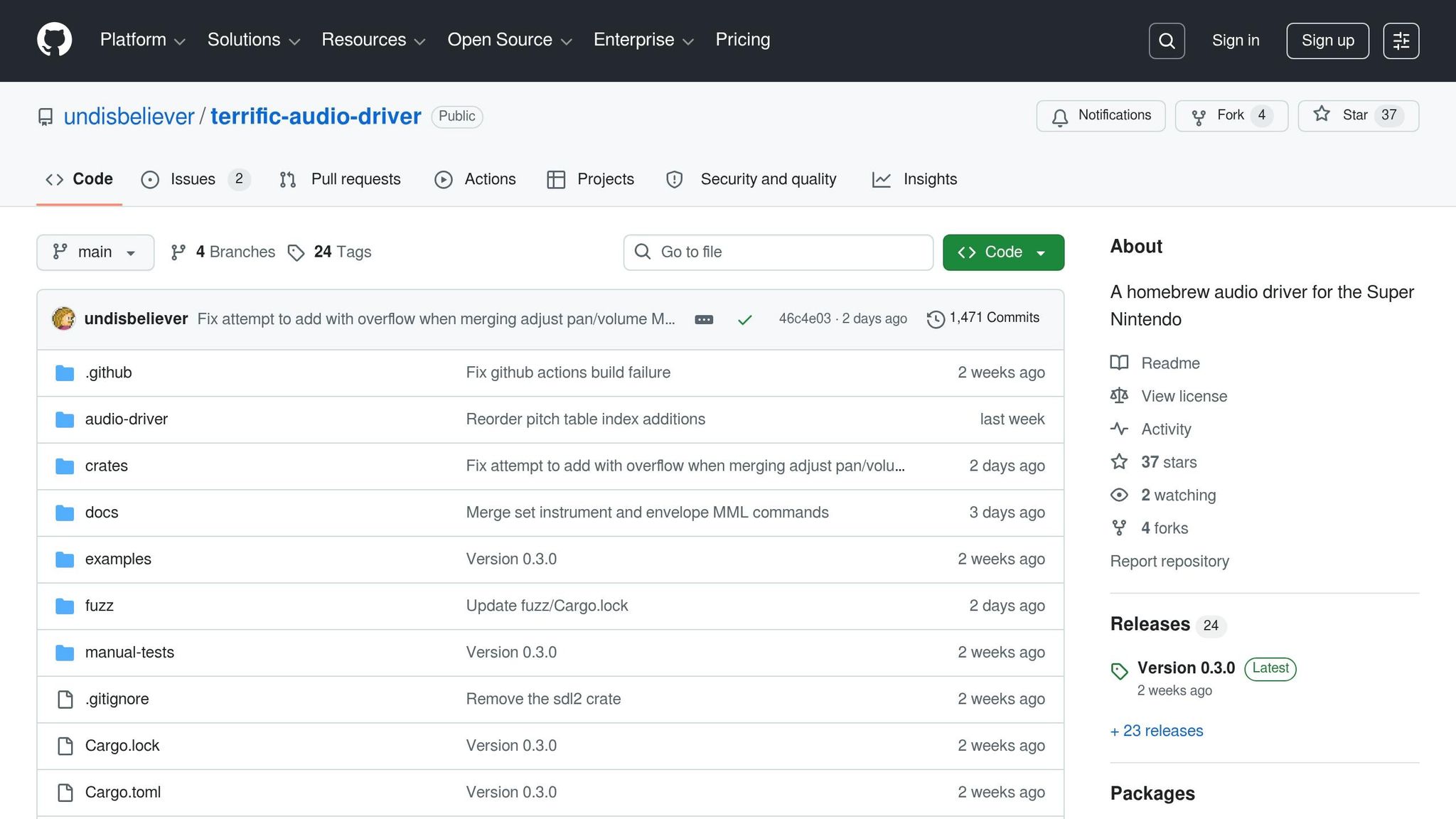
The Terrific Audio Driver makes its mark with 8 dedicated music channels and 2 sound effect channels, which temporarily mute music channels G and H when sound effects are played. This clever design eliminates the usual compromise of sacrificing music tracks to accommodate sound effects. As Marcus Rowe humorously put it, "Why terrific? Because my audio driver is not Super". This driver is a perfect fit for SNES development, and you can find hardware for your projects in our retro gaming collections, enhancing multi-channel audio output while integrating seamlessly with other SPC700 tools.
Audio Customization Capabilities
The driver leverages Music Macro Language (MML) for composition, converting it into bytecode for efficient playback on the SPC700. By precalculating pitch values and offsets for portamento and vibrato, it reduces the real-time processing load. It also supports a range of advanced effects like vibrato, portamento, tremolo, panbrello, volume and pan slides, and detune, all of which work across mono, stereo, and surround audio modes.
A 256-pitch table (512 bytes) is stored in the Common Audio Data block. To save space, the compiler allows limiting an instrument's octave range, minimizing the required pitch table entries. The included tad-gui tool offers real-time editing with an audio emulator based on ares. Features like "Play at cursor position" make the composition process more efficient. While rich in music features, the driver also integrates effortlessly into modern development workflows.
Ease of Integration with SNES Development Tools
This driver works seamlessly with major SNES assemblers, including ca65, pvsneslib, 64tass, and asar. Its asynchronous API ensures minimal disruption to the main game loop. Audio data is loaded using a LoadAudioData callback, which can be auto-generated by the tad-compiler binary for the S-CPU.
Efficient management of multi-frame data loading and bank-boundary wrapping is built in. Before finalizing projects, developers can use the tad-compiler check command to ensure all songs fit within the SNES's limited audio-RAM. The GUI also includes a built-in RAM checker for this purpose, which is an added advantage since the CLI compiler doesn't automatically detect overflow.
Quality of Sound Output
The driver employs several techniques to elevate audio quality beyond standard SPC700 drivers. The "dupe block hack" copies the first few blocks of a waveform to the end of BRR samples, preventing glitches and jagged lines at loop points, particularly for smooth waveforms like sine waves.
Virtual channels delay DSP register writes until the next tick, avoiding volume and pan glitches. Additionally, a 1-tick delay (about 8ms) between key-off and key-on events eliminates the popping sounds common in other drivers. While this virtual channel implementation uses 16% of the CPU budget (about 80 cycles per channel), the resulting audio quality makes the trade-off worthwhile.
Compatibility with Existing SNES ROMs
The Terrific Audio Driver is tailored for modern SNES homebrew projects rather than hacking existing ROMs. Tested on original 1-chip Super Famicom hardware with usb2snes for real-time feedback, it includes a custom loader that speeds up data transfers to the SPC700 compared to standard IPL loaders. For developers creating custom SNES projects, features like surround sound, channel inverting, and custom FIR filters offer creative possibilities rarely found in commercial audio engines. Built for today's homebrew scene, this driver pushes the boundaries of what the SPC700 can achieve.
Where to Get Custom Cartridges of These Hacks
If you've been diving into digital SPC700 audio hacks, you’ll be thrilled to know that you can now experience these creations on original SNES hardware with tangible cartridges.
Finding SPC700 audio hack cartridges isn’t easy, but BJ's Game Vault has carved out a niche for exactly this. The store specializes in rare ROM hacks and custom game cartridges designed specifically for retro consoles. Each cartridge is rigorously tested on authentic hardware to guarantee compatibility and performance - essential for audio-enhanced hacks.
Prices for these cartridges typically range between $35 and $50. You can explore their "SNES Titles" section for hacks that feature enhancements like AddMusicK, SNESMOD, or the Terrific Audio Driver. Every order comes with free shipping and a Collector's Guarantee, adding extra value to your purchase.
For collectors and enthusiasts, BJ's Game Vault also offers a subscription service. The Basic Tier costs $45/month and includes two cartridges, a collectible, stickers, a discount card, and free shipping. The Premium Tier is priced at $85/month and offers three cartridges, three collectibles, plus the same extras. These tiers are perfect for anyone looking to regularly expand their collection while enjoying exclusive perks.
Additionally, the store provides custom game creation services for SPC700 hacks, allowing you to bring your own ideas to life on physical cartridges. Subscribers to their mailing list also gain early access to special deals, making it a great way to stay ahead in the retro gaming scene. These services bring the creative energy of SPC700 audio hacks directly into your hands, offering a nostalgic yet innovative gaming experience.
Conclusion
These five SPC700 tools open up exciting possibilities for creating custom SNES audio. The C700 VST integrates seamlessly with modern DAWs, making it easier to connect 16-bit hardware with contemporary workflows. For those who prefer a tracker-based approach, SNESMOD offers a familiar environment for composing rich, 8-channel chiptunes. Custom BRR sample creation allows you to move beyond standard game instruments, while AddMusicK provides precise control for crafting ROM hack soundtracks. Finally, the Terrific Audio Driver gives you full command over all eight SPC700 channels, completing this powerful toolkit.
What makes these tools stand out is their accessibility. As HVB, the author of the SNES Chiptune Guide, explains:
"My goal was to create accessible documentation for musicians and hobbyists alike, regardless of their level of experience".
This user-friendly approach is matched by their technical depth. These tools support output sample rates up to 64 kHz, MML-based programming, and .WAV to BRR conversion, ensuring compatibility with original SNES hardware. Testing your compositions on an actual SNES console ensures they sound just as you envisioned.
Whether you're adding custom music to a Super Mario World hack or developing a brand-new SNES demo, or even adding custom music to NES ROMs, these tools give you professional-level control over the entire SPC700 sound system. While MML programming might feel more technical compared to tracker-based workflows, the creative possibilities it unlocks are worth the effort. Staying true to the innovative spirit of retro SNES audio, these tools reshape how custom music is crafted.
Start with the tool that aligns best with your workflow, and build from there as your skills grow. With the SNES audio hacking community expanding, your creations could set a new standard in retro gaming soundtracks.
FAQs
Which tool should I start with for SPC700 music?
If you're diving into SPC700 music creation, SPC Tool v0.61 is a fantastic place to start. This tool acts as an emulator and utility, allowing you to work with SPC files seamlessly. It includes features such as emulation, ripping, and debugging, making it a great choice for beginners looking to explore and experiment with SPC700 music editing.
How do I avoid pops and clicks on real SNES hardware?
To avoid pops and clicks on actual SNES hardware, it's crucial to balance the audio channels properly. Many older SNES and Super Famicom systems experience audio imbalances due to the way the DAC's Vref pins are connected. You can address this issue by isolating one Vref pin, connecting it to the positive lead of a 47 µF capacitor, and grounding the capacitor's negative lead. Additionally, ensuring smooth audio transitions during playback can further reduce potential issues.
What’s the best way to make clean looping BRR samples?
To make smooth looping BRR samples for SNES audio, it's crucial to align loop points to 16-sample boundaries, as required by the SNES sampler. Downsampling the audio to 32,000 Hz helps maintain sound quality while avoiding unwanted artifacts. Tools like BRRTools can assist in setting precise loop points and trimming any extra data after the loop point to eliminate unnecessary noise. By carefully preparing your samples, you can achieve clean, seamless loops that work perfectly for SNES audio.